Monitors and Screens in Events: Visual Infrastructure for Clarity, Control, and Audience Alignment
Monitors and screens are among the most essential visual components in professional event environments. While often discussed collectively as display technology, their function extends far beyond showing content. Monitors and screens define sightlines, support speaker confidence, enable production control, and ensure that information is delivered consistently across physical and digital audiences.
In modern events, where presentations are multi-layered and formats span live, hybrid, and virtual participation, monitors and screens form a distributed visual network. Their placement, configuration, and integration directly influence comprehension, engagement, and operational precision. This article examines monitors and screens as core event infrastructure, focusing on their roles, types, and strategic importance in professional event delivery.
The Role of Monitors and Screens in Modern Events
Monitors and screens serve different audiences simultaneously. They support attendees in large rooms, guide speakers on stage, assist technical crews behind the scenes, and provide visual continuity for remote viewers.
Unlike decorative visual elements, monitors and screens are functional tools. They ensure that content is visible from every position, that presenters remain aligned with material, and that production teams maintain situational awareness. In hybrid events, they also bridge physical and virtual spaces by synchronizing visual information across locations.
Because of this multi-role function, monitors and screens must be planned as an integrated system rather than individual components.
Why Monitors and Screens Require Strategic Planning
Poor screen placement or incorrect sizing undermines content delivery immediately. Attendees who cannot clearly see slides or speakers disengage, regardless of content quality.
Strategic planning for monitors and screens must consider:
Audience size and seating layout
Viewing distance and angles
Content resolution and aspect ratio
Ambient light and contrast conditions
Integration with cameras and streaming feeds
Effective planning ensures that visual information is accessible, legible, and consistent throughout the venue.
Core Types of Monitors and Screens Used in Events
Main Presentation Screens
Main screens serve as the primary visual reference for attendees. These may be large LED walls or projection screens positioned behind or beside the stage.
Their role is to display presentations, speaker imagery, video playback, and live camera feeds. Screen size and resolution must align with room depth to ensure readability for the farthest audience members.
Main screens also define the visual identity of the event and influence how content is perceived.
Confidence Monitors
Confidence monitors are screens positioned for speakers rather than the audience. They display presentation content, timers, speaker notes, or live camera feeds.
These monitors support speaker flow and reduce the need for presenters to turn away from the audience. Proper placement is essential to maintain natural eye contact and posture.
Confidence monitors are especially important in keynote presentations, panel discussions, and broadcast-focused events.
Stage Monitors and Floor Displays
Stage monitors include floor-mounted or low-profile displays positioned at the edge of the stage. They are commonly used to show notes, prompts, or visual cues to presenters.
These monitors must be carefully calibrated for brightness and viewing angle to avoid glare or distraction. Their effectiveness depends on precise positioning relative to speaker movement.
Audience Overflow and Distributed Screens
Large venues often require additional screens to serve overflow seating areas, balconies, or side sections. Distributed screens ensure that all attendees receive the same visual information regardless of location.
These screens must be synchronized with main displays to avoid latency or content mismatch. Poor synchronization disrupts comprehension and creates visual confusion.
Back-of-House and Technical Monitors
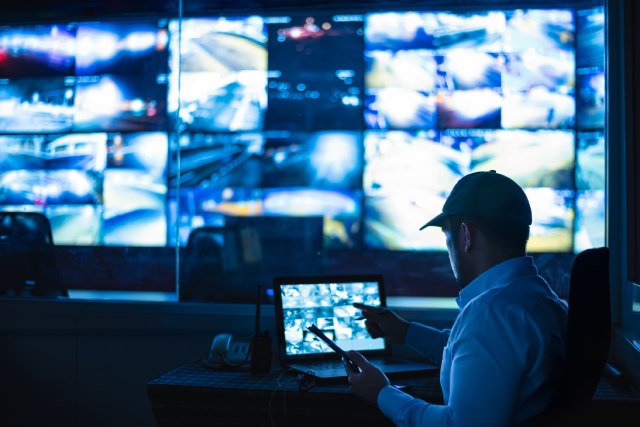
Behind the scenes, monitors are used by production teams to manage video feeds, cue content, monitor audio-visual alignment, and track session progress.
These monitors provide situational awareness and support rapid response to issues. They are critical for maintaining consistency and reliability during live events.
Monitors and Screens Across Event Formats
In-Person Events
In live environments, monitors and screens primarily support visibility and focus. Their placement must account for physical obstructions, audience height variation, and lighting conditions.
In-person events benefit from layered display strategies, where multiple screens reinforce rather than duplicate content.
Hybrid Events
Hybrid events significantly increase reliance on monitors and screens. Screens are used to display remote speakers, live feeds, chat highlights, and real-time interaction elements.
These displays help integrate remote participants into the physical environment while ensuring that in-room activity translates effectively to virtual audiences.
Hybrid formats demand precise synchronization and consistent visual standards.
Virtual Events and Studios
In virtual production environments, monitors and screens guide speakers and hosts by displaying remote participants, prompts, or live program feedback.
They support pacing, interaction, and technical awareness. Even in fully virtual formats, screen configuration influences presenter performance and audience perception.
Technical Considerations for Monitor and Screen Selection
Resolution and Pixel Density
Screen resolution must align with content type and viewing distance. Text-heavy presentations require higher pixel density to remain legible at scale.
Overspecifying resolution increases cost without visible benefit, while underspecifying reduces clarity. Effective screen selection balances technical capability with practical viewing conditions.
Brightness and Contrast
Ambient light conditions directly affect screen visibility. High-brightness displays are necessary in well-lit venues, while lower-brightness screens suffice in controlled environments.
Contrast ratios influence readability and image depth. Proper calibration ensures consistent appearance across all screens.
Aspect Ratio and Content Compatibility
Monitors and screens must match the aspect ratio of presentation content and video feeds. Mismatches result in letterboxing, cropping, or distortion.
Content guidelines and testing prevent visual inconsistencies during live sessions.
Integration With Video and Audio Systems
Monitors and screens operate as endpoints within a broader video distribution system. Signal routing, scaling, and synchronization must be managed centrally.
Audio integration is also critical. Lip sync issues between screens and speakers are immediately noticeable and undermine professionalism.
Integrated planning ensures cohesion across all technical elements.
Accessibility and Inclusive Design
Monitors and screens support accessibility by improving visibility for attendees with visual limitations and those seated at greater distances.
Large fonts, high-contrast visuals, and clear layouts enhance readability. Screens can also display captions or sign language interpretation, supporting inclusive participation.
Accessibility considerations should be addressed during content design as well as display planning.
Operational Reliability and Redundancy
Screen failures are highly visible and disruptive. Professional setups include backup displays or alternate signal paths for critical areas.
Routine testing, monitoring, and contingency planning reduce the risk of interruption. Reliability is achieved through preparation rather than reaction.
Cost, Scalability, and Long-Term Value
Monitors and screens represent a significant portion of event production budgets. However, their value extends across multiple events when selected for durability and flexibility.
Modular systems support different venue sizes and configurations, increasing return on investment over time.
Cost evaluation should consider longevity and adaptability, not just immediate needs.
Limitations and Appropriate Use
Not all events require extensive screen networks. Smaller, highly interactive formats may benefit from minimal visual infrastructure.
Overuse of screens can dilute focus and reduce human connection. Screens should support communication, not replace it.
The Role of Monitors and Screens in Contemporary Events
Monitors and screens are no longer passive display tools. They are active components of event communication and control.
Their effectiveness is measured by consistency, clarity, and alignment with event objectives rather than size or quantity.
Conclusion
Monitors and screens form the visual backbone of modern event environments. They ensure that information is visible, speakers are supported, and production teams remain in control across live, hybrid, and virtual formats.
For event professionals, thoughtful planning of monitors and screens is essential to delivering clarity and confidence at scale. When integrated properly, these displays become invisible enablers of understanding rather than sources of distraction.
At EventTechnology.org, monitors and screens are best understood as visual infrastructure—precise, reliable, and central to how events are seen, understood, and remembered.