Monitors and Screens in Events: Visual Infrastructure for Information, Control, and Experience
Introduction: Visual Surfaces as System Interfaces
In event environments, screens are not merely display devices—they are interfaces through which information, content, and control are delivered. From large-scale LED walls to small confidence monitors, visual systems define how content is consumed, navigated, and managed across both physical and digital spaces.
As events evolve into hybrid, data-driven ecosystems, monitors and screens must operate as integrated infrastructure. They are responsible for rendering content across multiple contexts—presentation, navigation, production control, and audience engagement—while maintaining consistency, synchronization, and reliability.
Categories of Event Screens and Monitors
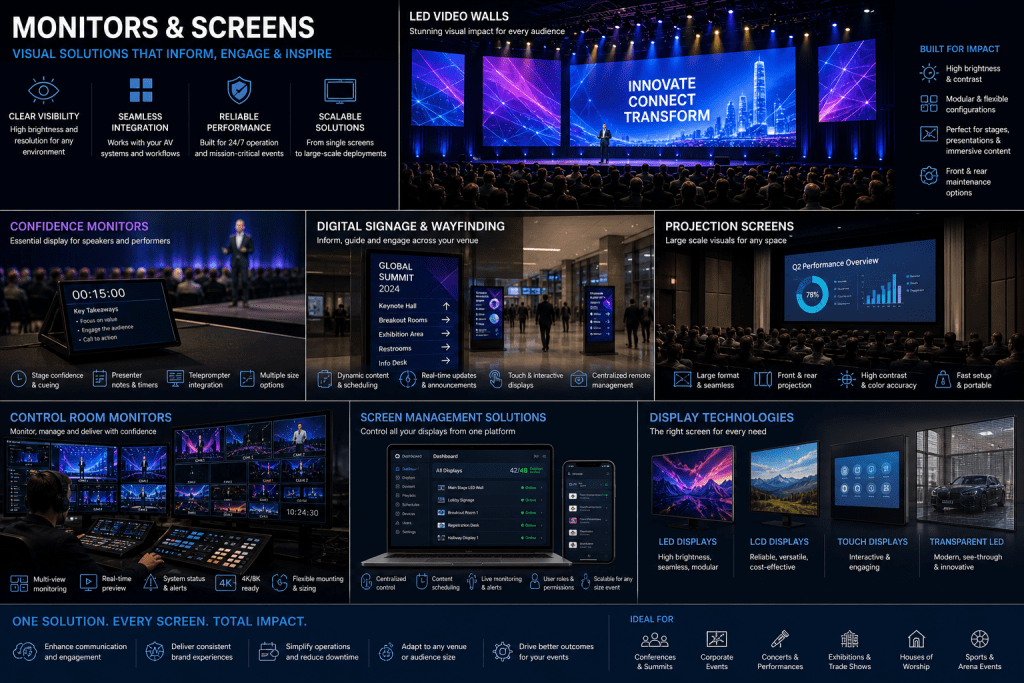
LED Walls and Large-Format Displays
LED walls are the primary visual surfaces for large audiences.
Key characteristics include:
- High brightness and visibility in varied lighting conditions
- Modular design for flexible sizing and shapes
- High refresh rates for smooth video playback
They are commonly used for:
- Stage backdrops
- Keynote presentations
- Immersive visual environments
Projection Screens
Projection systems offer flexibility for temporary or large-scale installations.
They are suited for:
- Large venues where LED walls may be impractical
- Architectural projection and immersive environments
- Cost-sensitive deployments
Performance depends on ambient light control and surface quality.
Confidence Monitors
Confidence monitors are placed within the speaker’s line of sight to provide real-time information.
They display:
- Presentation slides
- Speaker notes
- Timers and cues
These monitors are critical for ensuring smooth delivery and speaker confidence.
Digital Signage and Wayfinding Screens
Digital signage systems provide dynamic information across venues.
Applications include:
- Session schedules and updates
- Directional guidance
- Sponsor and branding content
These systems are often networked and centrally managed.
Production and Control Monitors
In control rooms, multi-screen setups enable operators to monitor and manage event systems.
These displays show:
- Camera feeds and program output
- Audio and video diagnostics
- System status and analytics
They are essential for operational visibility and decision-making.
System Architecture: Content Flow and Display Management
Content Sources and Inputs
Visual content originates from multiple sources:
- Presentation systems (laptops, media servers)
- Camera feeds
- Graphics and animation systems
- Data-driven content platforms
These inputs must be normalized and prepared for distribution.
Processing and Scaling
Video processors and scalers adjust content to match display specifications.
Functions include:
- Resolution scaling
- Aspect ratio correction
- Color calibration
- Multi-screen composition
This ensures consistent visual quality across devices.
Distribution and Routing
Content is routed to different screens using switching and distribution systems.
Modern systems use:
- SDI and HDMI for local connections
- IP-based video protocols for scalable distribution
Routing must be synchronized to avoid mismatches between displays.
Display Management Systems
Centralized software platforms manage content across multiple screens.
Capabilities include:
- Scheduling and automation
- Remote control and updates
- Real-time content changes
This is particularly important for large venues with distributed displays.
Integration with Event Technology Ecosystems
Screens are deeply integrated with other event systems.
Video systems provide primary content feeds, while lighting systems must be coordinated to avoid visibility issues.
Event data platforms can drive dynamic content—such as real-time schedules, analytics, or personalized messaging—displayed on screens.
In hybrid environments, screens also act as interfaces between physical and virtual audiences, displaying remote participants and interactive content.
Experience Design: Visibility, Context, and Engagement
Effective screen deployment requires careful design.
Visibility and Placement
Screens must be positioned to ensure clear visibility for all attendees. This includes:
- Line-of-sight considerations
- Viewing angles and distances
- Redundancy for large audiences
Content Design
Content must be optimized for readability and clarity.
This involves:
- Appropriate font sizes and contrast
- Simplified layouts for quick comprehension
- Adaptation to different screen sizes and resolutions
Contextual Relevance
Screens should display contextually relevant information based on location and audience.
For example:
- Wayfinding screens show navigation information
- Stage screens focus on presentation content
- Control monitors display operational data
Operational and Business Impact
Monitors and screens play a critical role in event execution.
For attendees, they enable clear communication and navigation. For speakers, they provide essential cues and support.
For organizers, they offer centralized control over content delivery and messaging. For sponsors, they provide high-visibility branding opportunities.
Strategically, effective screen deployment enhances professionalism and audience engagement.
Technical Challenges
Event screen systems must address several challenges:
- Managing multiple resolutions and formats
- Ensuring synchronization across displays
- Handling high bandwidth requirements for video content
- Maintaining reliability in large-scale deployments
Environmental factors, such as lighting conditions, also impact performance.
Future Outlook: Intelligent and Adaptive Display Systems
The future of event screens lies in intelligent, adaptive systems.
AI-driven content management will enable:
- Dynamic content personalization
- Real-time adjustments based on audience behavior
- Automated scheduling and optimization
Advances in display technology—such as microLED and flexible screens—will expand design possibilities.
Integration with XR and spatial computing will further blur the boundaries between physical and digital displays.
Conclusion: Screens as Dynamic Event Interfaces
Monitors and screens are foundational components of modern event infrastructure. They serve as the primary interfaces through which content, information, and control are delivered.
By integrating display systems with broader event technologies, organizers can create cohesive, responsive, and engaging environments.
For event technology leaders, the focus is not just on deploying screens—but on designing visual systems that enhance communication, navigation, and overall experience.