


Description
Beat Production – Anywhere
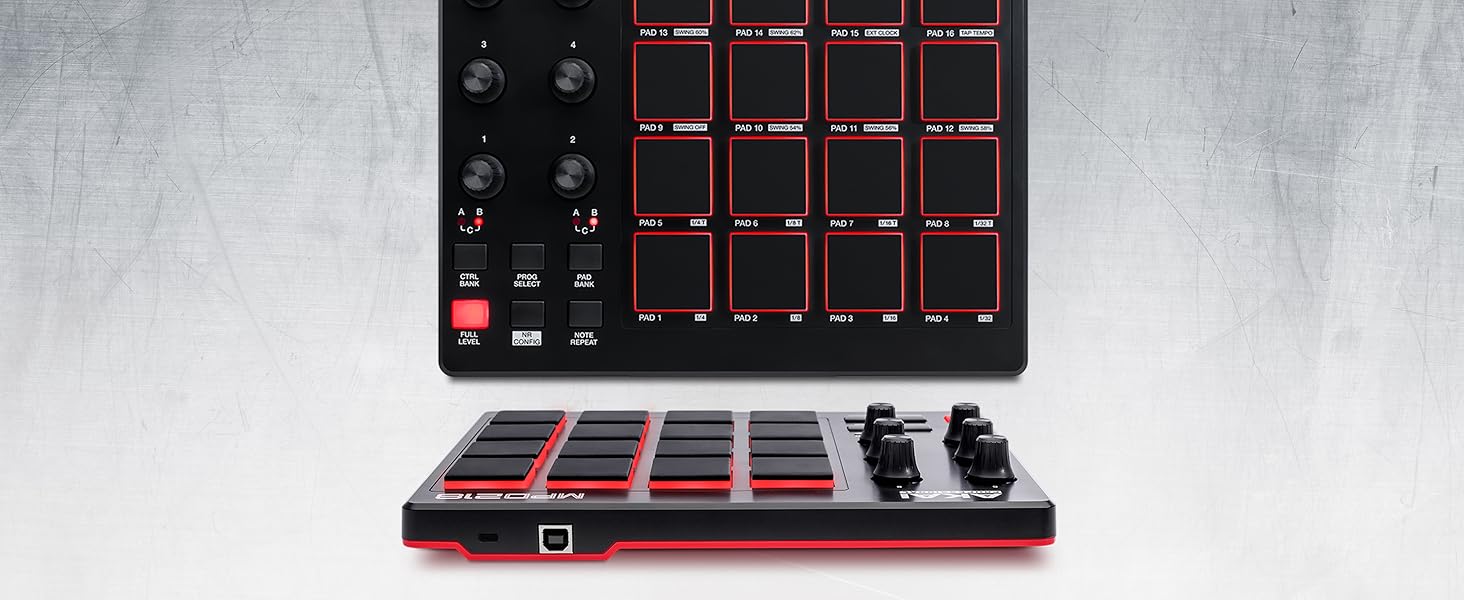
Akai Professional’s MPD218 is a MIDI-over-USB pad controller perfect for producers, programmers, musicians and DJs alike. Its intuitive blend of MPC controls and technologies mesh with seamless USB connectivity to bring the feel of classic beat making into the world of computer music production. At the heart of MPD218 are 16 ultra-sensitive, hyper-playable. Thick Fat MPC pads, ideal for triggering drums, one-shots, melodic samples, basslines and more; with 3 pad banks available and a pressure- and velocity-sensitive specification, expand MPD218’s performance capability to 48 fully-assignable, ultra-reactive triggers that capture every subtlety and nuance of your performance.
From the brand
From the manufacturer


The Ultimate Beat Production Studio Centerpiece
The MPD218 is a MIDI-over-USB pad controller perfect for producers, programmers, musicians and DJs alike.
Its intuitive blend of MPC controls and technologies mesh with seamless USB connectivity to bring the feel of classic beat making into the world of computer music production.

MPC Beats Software
Whatever you set out to achieve, MPC Beats will get you started. Incorporating the finest parts of the legendary MPC workflow, MPC Beats features all the essential tools for pro production.
Edit samples, mixdown your tracks, find any sound with the synth engines found on the legendary MPCs, record audio and much more.
MPC Beats will host your AU/VST plugins so as you expand your arsenal, know you’ll have complete compatibility with industry standard virtual studio technology.


Doug Bowker –
Solid Entry-Level Pro ProductBought for my son (age 16) for Christmas, and he had it up and running on his PC (Window 10) in very little time. He’s really enjoyed working on it in the few days since, probably for a couple of hours per day. As the product description mentions, the software allows you access to a number of “starter” music and beats samples until you start bringing in your own.Very solidly built, all the pads, buttons and dials have a nice “equipment-grade” feel and not at all like you find on a toy (which it isn’t). The software that you download once it’s registered to very much full featured, yet not so dense that someone experienced with other creative software (like any of the Adobe suite for example) wouldn’t be able to start using relatively quickly. That said, this is not something I’d buy if one was a complete beginner or not already fairly tech-savvy.Obviously, it’ll take a little time to get used to how it all works, but in my mind that’s a good thing; anything one could master in an afternoon will soon show its limitations. This looks like it could be used for some very sophisticated music and beat making; probably it’d be good for creating sound effects too. For the really motivated, this product could definitely be part of a professional setup and in that light the cost seems especially reasonable.
Amazon Customer –
Does exactly what I needed it forOut of the box this will probably not work for beginners. There’s a lot of prep work to do in your DAW and in the MPD226 editor. I use it with Nuendo (Cubase for Post) and Live. With version 12 of Nuendo, I just built a custom device script fairly easily. It works great and better that way as I have full access to all the CC controllers at a push of a button. This is not the case with the factory DAW templates inside the MPD which are helpful as a starting point but need tweaking. The unit comes with MPC Beats which I thought was really cool considering what it can do if you don’t have any other DAW. The manual is useless so unless you are well versed with controllers fire up Youtube and Reddit. What I like most about this are the pads; they are nice, thick and very sensitive/responsive. The build is solid; not the plastic box I was excepting so it was a nice surprise. Overall good product, solid build, lame documentation.
Matt –
Electrical Tape is Your FriendEDIT 7/14/2019:*There is 3/8″ black cloth “pickup coil tape” on Stewmac.com. I use this for guitar work, so I had some on hand, but it just so happens it’s the perfect width for this job. I also recommend the Double Stick tape, also available on Stewmac, and using this on the bottom of the black cloth tape. This ensures good adhesion to your rubber MPC pads. The black cloth tape seems to be more consistent than traditional electrical tape, and is easier to work with. Simply cut it into one inch strips and layer them together as needed, with double stick tape on the bottom.*I’m using 2 strips for most pads. Add more and see if you like the feel or not. Adjust accordingly.*I’ve found that setting these up is a balancing act. Every single screw makes a difference: installed/not installed, and how tightly installed, both on the circuit board itself and the red shell/cover that fits over the device. As for the tape: more tape can actually reduce the velocity range/sensitivity, which can be a good thing. Hyper-active pads that are triggering with too much velocity compared to the others may benefit from extra tape, not less. Balancing act.*Currently I’m using no screws on the circuit board at all. On the hard red plastic cover, I’m using only the 4 outside screws, and have them slightly backed off, about 1/4 turn. This seems to be enough to hold everything in place, and gives great sensitivity response with the least amount of accidental triggering.*I still get double triggering if I use the “Full Level” button, and I still get some accidental triggering of other pads, though they’re usually at such a low velocity you can’t hear it. My main problem was the Snare triggering the Closed Hi Hat pad(s), so when I’d do Snare and Open Hi Hat together, often the Open Hi Hat would be completely cancelled out by the Closed Hi Hat pad triggering. Setting up the pad as I’ve explained here fixed that. It may be that a lot of these pads are defective. But defective doesn’t mean “not salvageable.” It’s a ton of work, and a major pain, yes — but salvageable, and beyond that, transformable into a great pad controller. Now, back to my original review:I carefully disassembled the MPD218 and cut electrical tape to fit over the pads. This is a well-known trick online, and the simple idea is this: it reduces the force you need to strike the pads with in order to trigger them, and especially to trigger them fully.As others have mentioned, the other setup option is to very slightly back off on the screws that hold the circuit board down. You can even leave only the 4 outer screws attached and remove the 4 inner screws. Or remove all the screws on the circuit board completely. I’ve had the best luck so far by removing all of them completely, and only using the 4 outer screws on the hard red plastic back cover.Tape method:Step 1: Remove the screws holding the cover on. You’re gonna want a magnetic holder or well-sealed plastic bag to keep the screws in as you remove them…trust me. Now take the cover off.Step 2: Now remove the smaller screws that are holding the circuit board in place. Then carefully lift the circuit board and place it out of harm’s way. You’ll see a thin plastic sheet underneath with squares on it. Remove the conductive plastic sheet once you get to it. Remember: it needs to go back on the right way, i.e. the conductive side facing the circuit board, or else it won’t work when you plug it back in. Shiny side = insulated side. That goes down on top of the rubber pad. Make sure the conductive Matte finish side is facing up when you’re all done.Step 3: Now you can easily remove the pads. It’s literally just a floppy mass of rubber, all one piece, that you can just lift out. Take it out, and get some electrical tape and some scissors or an Xacto knife ready.Step 4: Cut the tape, similar to how I did it in the picture. On the MPD218, the LEDs are dead center. So if you cover them with tape, the LEDs will be obscured and your pads won’t light up.You can customize it however you want. I’m using two layers of tape. You may like more. You may like less.Step 5: Reassemble. And you’re done! Good job. Now test your MPD218 for responsiveness.Now I’m enjoying my newly set up MPD218 much more than before. Very, very light touches also seemed to trigger nothing before, whereas now they trigger exactly what I want: very light, soft sounds.Just be careful with the screws and the circuit board when dismantling and reassembling this thing, and you’ll be fine. It’s a very easy fix. Just a bit time consuming when it comes to dialing it in perfectly.Overall I’m very happy with this unit. It looks good, was very easy to work on, and with a couple tweaks, it’s performing extremely well. It needs to be set up properly just like any other instrument. Which is always a pain. But it’s to be expected. The only major issue is the “Full Level” button, which I simply don’t use. Akai really needs to address whatever is going on with that.
Michael and Nina –
Everything I wanted and we’ll builtBeing new to the MIDI controller world, this is the first of this type of gear I’ve purchased.After watching many reviews on YouTube and reading reviews here, I have to say that In extremely impressed with this instrument.The pads are excellent and respond well to all types of playing, the knobs don’t have that ‘cheap’ feel but are firm quality endless turns.Truthfully I’m still learning the free software that came with it and it too deserve 5 stars.A small learning curve but it recommends several tutorials and how-to videos.Finger drumming on this has been a perfect experience. It also works with almost any DAW.For the novice or professional musician, DJ or producer, this is an awesome tool to have in your arsenal.
Carson Cooley –
Great Hardware with terrible softwareThe MPC studio is well built, looks great, and has good capabilities. The issue arises when you get to the software side. The MPC 2 software works for beat making and all that fine, but it lacks basic options that are on 99.9% of all PC programs including not being able to choose or change install locations and the location it puts samples( it doesn’t even tell you where you need to find them). This wont be a problem for everyone but I have all of my music production stuff on a separate drive as my C drive’s space is at a premium so when I want to install MPC 2 on my F drive only to learn that my only option is C drive to the point that if I try to use symbolic links to make the program think its on my C drive it just crashes hard.If you have a very big C drive and dont mind where the MPC 2 or its sound files go then the MPC studio is prob fine and id even recommend it.
Ajani Is Great –
Block this one my son’s birthday he seems to love itI bought this product for my son’s 13th birthday. Though I know none of the mechanics or how it works he seems to love the device and works with it often.
Edward Tang –
Best choice for beginner.Value for money… Best choice for beginner.
Gwugluud Barcher –
Included software was undownloadable.The pads work a treat. Best I’ve ever tried. The pads are arranged funny; odd places for the snare, bass, etc, but I dare not try to go in and change anything; in my experience, attempting so will confuse the unit, and it may stop working. The software included was a hoax. I got the drum VST onto my home screen, but it only got in as “standalone” mode, so it’s useless insofar as my DAWs. Disabledton Lite does what it always does every time – halfway into the load, it decides that an “error” has been made, and it aborts. This exact same thing happens, in exactly the same way, every single time, and no, it isn’t me; this has happened on my previous computer before upgrading to this one as well. I purchase/download VSTs often, and I seldom have a problem, so it isn’t me, although even knowing this still won’t soothe the butthurt of the bitter trolls who will malign me, and I expect to get “Your a idoit” , “Your stuped”, and other flat-earther “repartees” soon after posting.Disabledton Lite is just clickbait, designed to get you to choose this over similar offerings.
By_Rant_Or_Ruin – truth. –
THIS IS NOT good – It will NEVER BE GOOD because it was never meant to be good. Just read their forum and EULA.I fell for the new toy. As with so many of the modern software makers out there, Akai has the same attitude about their offering – “This is a stick-up! Test our crap for us for free, and give us your money too.” It is put upon the paying customer to figure out all the problems with the buggy, bat-crazy, upside-down, incomprehensible install job, that is thrust upon the digital musicians of this world. In my not so humble opinion, ridiculous FOOLS wrote this code.THE JUNK:The midi button controls don’t align 1 through whatever pads to software. They light up randomly in the software.The software assigning is deep, but it never saves a state of settings without some issue.The pots on this are stiff, it would work for some things but mostly not. It gives an artificial sense of solid construction.Switching the banks on the controller does not switch them in the DAW or MPC software.The one time (yup – one) this thing read my Vst folder without crashing, it named them all wrong. suddenly drums were cross named with other instruments.Every other time I tried to add Vst folders – the MPC crashed – even after hours of FAQ and videos and reading install notes and so on, hours of changes all lost and hopeless.A warning would pop up with every restart stating that my audio card had changed – every time – and would I like to adjust my preferences. GAH! I only have ONE installed audio adapter and it was already selected, over, and over, and over.There was a distinct delay beyond normal response times from the tap of a pad to the MPC seeing it, and most of the time the pad tapped would not be the pad used in the MPC software. GAH! No damit the bass drum! not the crash-GAH!In the online forum (which in this case means: for them idiots we sold this to) what worked for one person did not work for me.AND LASTLY THE BIGGY STUPID INTERFACE MASHUP:I should not have to adjust MY ENTIRE OS DESKTOP INTERFACE TO MAKE THIS CARP WORK. Wide screen, text enlargement and drag and drop have been around for over 20 years, Akai must have missed the last two decades of advancements.WHAT THE?:People just keep on buying this garbage and calling it platinum. Why? I was mislead.Why do we keep testing their junk and solving their problems for them after having paid for a working product? Are we all that desperate for a tappy thingy?EULA JUNK: KIDDIES WILL BE BORED:EULA anyone? Thanks to the supreme court of this great nation, These cretins can now require us to give away our rights as of the moment we use the software (if that’s what you want to call this riddled-pockmarked and weeping-pile of broken code.) And so they can give out whatever they want, lie about it, and not have to face any repercussions.For every one who finds out the hard way – ten new people fall for this package in the hopes of a great deal and a way into a simple control interface. Seemingly Akai can’t manage a working product never mind one simple to use.THERE IS GOOD AND THEN THERE IS ACTUAL GOODNESS:It isn’t good- none of this product is good.Good, as a general rule – works.Good, gets us motivated and firing on all cylinders. GOOD gets a bad man good, and a good woman bad. Good is not what this product is and if they come at me with fire and brimstone, I will shrug it off because: 1) I’m an Athiest, and so therefore 2) once someone makes a claim of something that cannot be supported by facts it is THEIR problem to PROVE the claim has merit. Oh… that’s what I am doing with this rant.THE TOUGH QUESTIONS MUST BE ASKED:Is it that they have no respect for their customers? Oh my friends – I think it is worse than that. I think they have a true disdain for their customers. EVIDENCE FOR MY STANCE IS IN THE FORUM AND THE FAQ AND THE EULA.OOPS:This software is Akai’s promise of entry level excellence with the actual delivery of, UH-OOPS- Ah shucks was that us? If you look at their add campaign, It’s like a bad episode of Mad Men. They are quite serious about this terrible solution they have strung together, with the intent, and the ethics of the “New Trumpians.” (My phrase – mine)THE UNREAL: this stuff has been on the market for years and it is still useless for any serious creation – buttons and all.I had no idea it was this bad until I purchased it. I thought, briefly, at a minimum, that crashing software at this level would be unheard of. Perhaps they should employ better coders – not crazies with a new plan of vendetta against the world because Steve Jobs died, and Kurzweil never made a great keyboard.SO GOOD THEY DID IT AGAIN:Weather it be MPC essentials or MPC 2.0, BROKEN IS BROKEN. Reasoning would find a normal business meeting that concludes: if it doesn’t play well with newer systems, heck – with any system, without crazy high=jinx don’t sell it to the group of people being relied on to better the bottom line.BIGGEST PROBLEM: if I have to set up anything for hours just to get it to work (it never did wholly work), I lose money, intensity, and creativity. Is Akai going to pay me back for those losses? They don’t have to according to their EULA. It is my fault for choosing their gear; for trusting them.Oh and how about the time it took for me to find all of this out on my own? Do I get my time or money back? Nope. How about for reviewing this for free, to keep you all from getting your time, and money stolen?Nope that was my choice so they are covered there too. I don’t get paid to be a watch dog.THE FINAL WORD:The problem with abusing trust, is when people like me choose not to forget.Haven’t you heard? Memories are better than ever thanks to all of the research being done, smoke or no smoke. Records online never go away either – well they do, but I will keep putting them back. The notion of never, suddenly outlives the expected financial life span of a corporation. Well except too big to fail banks, and apparently car companies; oh yeah, and housing sales and … well that’s another set of rants.Thanks for reading and please do not buy this product. There is other gear that will get an entry level digital musician where they want to go.
Amazon Customer –
Great but you have to be smart and know what you are buyingDont get discouraged by the 1 star reviews.If you know very well that this is a midi controller for a software which required you to learn the software then you will be happy with this.The pads are better than on the MPC One. They are bigger and from experience more sensitive too.The best part of it, only need one usb cable and its so light and small I can just grab it and put it on my lap. You can even play it with one hand holding it.Some of the controls are even better than the more expensive models. The sample start/end and then the zoom buttons are amazing.And the touch strip is something that Akai will probably add to the expensive models in newer versions. Its too good. You can have a performance fx without having to go to the fx menu like on the hardware. Which means you can do things like track mutes and cue next sequence while having the strip fx available.The midi out is also a plus. I basically control my Sp404 with it.