


Description
DIGITAL MIXER X32
View larger
DIGITAL MIXER X32
40-Input, 25-Bus Digital Mixing Console with 32 Programmable MIDAS Preamps, 25 Motorized Faders, Channel LCD’s, 32-Channel Audio Interface and iPad/iPhone* Remote Control
Game 2.0 Reloaded
The BEHRINGER X32 has changed the game by completely rethinking what is possible from a digital mixer – and tens of thousands of new users are enjoying the results. A fluid workflow coupled with a fully interactive user interface ensures immediate familiarity and instills confidence. Advanced engineering and meticulous design deliver stellar sonic performance at an extremely affordable price – changing the game entirely. Three companies shared a common vision – to engineer and build the very best- sounding, technically-advanced audio products for discerning professionals. The X32 Digital Mixer family is the result of the engineering, manufacturing and application expertise of legendary console manufacturer MIDAS, the iconic signal processing genius of KLARK TEKNIK and BEHRINGER’s unique ability to deliver a superior value proposition. The synergy between these three great companies runs deep in the X32. From the pristine, MIDAS-designed mic preamps to KLARK TEKNIK’s rock-solid, ultra-low latency SuperMAC networking technology and BEHRINGER’s completely re-engineered processing algorithms, X32 raises the bar on what a digital mixer can be. A singular passion for delivering advanced technology, unrivalled usability and true road-worthiness has enabled us to engineer a digital console that is the ideal vehicle for your creative expression. But we’re just getting started! With the introduction of the new 2.0 firmware, we have not only dramatically improved the workflow, but also added all-new capabilities including “Acoustic Integration” for total connectivity and control of your speaker and In-Ear Monitor (IEM) systems. Then we completely re-imagined the more than 50 onboard FX “Plug-Ins” and added classic processor examples based on “True Physical Modelling”. We’ve also made the X32 even more flexible, with swappable expansion cards for connecting to other multi-channel audio networking via USB, ADAT, MADI and Dante protocols, in addition to the onboard ULTRANET and AES50 connectivity. Above all, the X32 is designed to put the power of digital in your hands – without compromise. You Win.
Intuitive. Immediate. Natural.
X32 is your mind-to-sound interface… the intersection of creativity and production. Whether you’re accustomed to digital mixers or not, the X32’s intuitive user interface offers a fluid mixing experience that instantly feels like home. And then there is the X32’s latest version 2.0 firmware. We’ve added new scene management features and EQ functions, including a 100-band Real Time Analyzer, flexible library import/export capability and faster FX editing. We also included 16 new FX “Plug-Ins” which are based on True Physical Modeling of famous classic audio hardware. This process means that we essentially “rebuilt” classic analog gear in the digital domain. And then we added the most amazing digital networking that allows you to connect to the new TURBOSOUND iQ speakers via simple CAT5 connection. We call it “Acoustic Integration”. This high-performance iQ Series also includes authentic acoustic modeling of some of the world’s most famous speakers – all remote controllable from your X32. This is the total solution you have been waiting for.
Motorized Faders
X32 serves the user a full complement of 25 long-throw, 100 mm motorized servo faders for primary mix control. Working in concert with the LCD Scribble Strips and TFT Display, the faders serve multiple functions while always keeping you informed. Separate fader sections for inputs and groups/buses allow for convenient assignments from inputs to groups/buses. With the ability to store up to 100 scenes, X32’s motorized faders jump to life the moment a scene is recalled.
7″ Main Display
X32’s 7″ day-viewable color TFT (Thin-Film Transistor) display shows the setting parameters you need when you need them. Selected for its high-contrast performance and outdoor visibility, TFT is ideal for concert and open air festival venues. Flanked by high-precision, context-sensitive tactile encoders, the screen comes to life and immediately reports in high definition all adjustments applied to a wide range of parameters. Intelligent design puts control of vital functions such as Effects, Metering, Routing and much more 1 or 2 button presses away.
LCD Scribble Strips
X32’s automated control surface is designed to present you with the control you need, when you need it. A total of 29 programmable LCD Scribble Strips offer channel/bus identification that mirrors what is being controlled. Use them to enter input/output tags, plus add icons you recognize at-a-glance. Then assign colors to create visual groups for immediate, on- the-fly recognition of similar inputs. Simple, elegant and effective – plus you’ll never need masking tape again.
Sends On Fader
X32 brings the convenience of digital mixing to your Aux and output bus mixes too, thanks to its integrated Sends on Fader feature. This incredible function allows you to build powerful, dedicated sub-mixes for monitor, secondary zone feeds, and much more—all without affecting the front of house mix or levels. The X32 allows you to send your choice of signals to any Aux or output bus and then dial in the perfect mix via the channel faders. The console remembers where you set the faders and instantly recalls them when you select a bus for quick adjustments.
Channel Strip
The X32 Channel Strip puts the most important channel processing parameters into one section so that no matter which channel you are working on, the controls are always the same. This highly-efficient layout stems from BEHRINGER’s decades of console design and input from our users. Optimized control illumination ensures a clear indication of levels or status from any viewing angle. Illuminated rotary encoders and switches give you control of preamp settings, frequency shelving, dual dynamics sections, as well as multi-mode fully parametric EQ, bus sends, main, mono and stereo panning.
DCA Groups
DCA (Digitally Controlled Amplifier) groups allow control over several signals at once without actually mixing them into a subgroup bus. X32’s 8 DCA groups let you control multiple signals via a single fader, such as the entire drum mix, the horn section, or the backup vocalists, etc. DCA control affects the FOH mix, while allowing the individual buses to remain unchanged. The result is a customizable workflow that provides maximum flexibility, but still allows individual buses and subgroups to serve the purpose they were intended for, such as zone sends, broadcast feeds, etc.
From the manufacturer
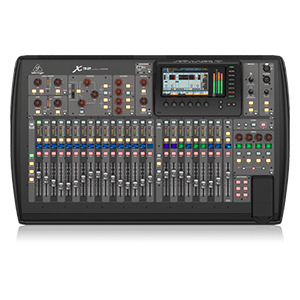
X32
40-Input, 25-Bus Digital Mixing Console with 32 Programmable Midas Preamps, 25 Motorized Faders, Channel LCD’s, 32-Channel Audio Interface and iPad/iPhone* Remote Control
- 40-input channel, 25-bus digital mixing console for Studio and Live application
- 32 Midas-designed, fully programmable mic preamps for audiophile sound quality
- 25 Fully automated motorized 100 mm faders allow for instant overview, powerful scene management and DAW control
- 32 x 32 channel USB 2.0 audio interface, with DAW remote control emulating HUI* and Mackie Control*
- High-resolution 7″ day-viewable Color TFT for easy viewing of workflow components and parameters
X32
|
|
|
|
|
|---|---|---|---|
X32The Behringer X32 has changed the game by completely rethinking what is possible from a digital mixer – and hundreds of thousands of users are enjoying the results. A fluid workflow coupled with a fully interactive user interface ensures immediate familiarity and instills confidence. Advanced engineering and meticulous design deliver stellar sonic performance – changing the game entirely. Three companies shared a common vision – to engineer and build the very best- sounding, technically-advanced audio products for discerning professionals. The X32 Digital Mixer family is the result of the engineering, manufacturing and application expertise of legendary console manufacturer Midas, the iconic signal processing genius of Klark Teknik and Behringer’s unique ability to deliver a superior value proposition. |
Enhanced Workflow & Multi-Channel NetworkingWith the introduction of our new X32 version 2.0 firmware, we have not only dramatically enhanced the workflow, but also added all-new capabilities including “Acoustic Integration” for total connectivity and control of your speaker and In-Ear Monitor (IEM) systems. Then we completely re-imagined the more than 50 onboard FX “Plug-Ins” and added classic processor examples based on “True Physical Modelling”. We’ve also made the X32 even more flexible, with swappable expansion cards for connecting to other multi-channel audio networking via USB, ADAT, MADI and Dante protocols, in addition to the onboard ULTRANET and AES50 connectivity. Above all, the X32 puts the power of digital in your hands – without compromise. You Win. |
Intuitive. Immediate. Natural.X32 is your mind-to-sound interface… the intersection of creativity and production. Whether you’re accustomed to digital mixers or not, the X32’s intuitive user interface offers a fluid mixing experience that instantly feels like home. And then there is the X32’s latest version 2.0 firmware. We’ve added new scene management features and EQ functions, including a 100-band Real Time Analyzer, flexible library import/export capability and faster FX editing. We also included 16 new FX “Plug-Ins” which are based on True Physical Modeling of famous classic audio hardware. This process means that we essentially “rebuilt” classic analog gear in the digital domain. And then we added the most amazing digital networking that allows you to connect to the new Turbosound iQ speakers via simple CAT5 connection. We call it “Acoustic Integration”. |
Motorized FadersX32 serves the user a full complement of 25 long-throw, 100 mm motorized servo faders for primary mix control. Working in concert with the LCD Scribble Strips and TFT Display, the faders serve multiple functions while always keeping you informed. Separate fader sections for inputs and groups/buses allow for convenient assignments from inputs to groups/buses. With the ability to store up to 100 scenes, X32’s motorized faders jump to life the moment a scene is recalled. |


X32
|
|
|
|
|
|---|---|---|---|
LCD Scribble StripsX32’s automated control surface is designed to present you with the control you need, when you need it. A total of 29 programmable LCD Scribble Strips off er channel/bus identification that mirrors what is being controlled. Use them to enter input/output tags, plus add icons you recognize at-a-glance. Then assign colors to create visual groups for immediate, on- the-fly recognition of similar inputs. Simple, elegant and effective – plus you’ll never need masking tape again. |
Channel StripThe X32 Channel Strip puts the most important channel processing parameters into one section so that no matter which channel you are working on, the controls are always the same. This highly-efficient layout stems from BEHRINGER’s decades of console design and input from our users. Optimized control illumination ensures a clear indication of levels or status from any viewing angle. Illuminated rotary encoders and switches give you control of preamp settings, frequency shelving, dual dynamics sections, as well as multi-mode fully parametric EQ, bus sends, main, mono and stereo panning. |
7″ Main DisplayX32’s 7″ day-viewable color TFT (Thin-Film Transistor) display shows the setting parameters you need when you need them. Selected for its high-contrast performance and outdoor visibility, TFT is ideal for concert and open air festival venues. Flanked by high-precision, context-sensitive tactile encoders, the screen comes to life and immediately reports in high definition all adjustments applied to a wide range of parameters. Intelligent design puts control of vital functions such as Effects, Metering, Routing and much more 1 or 2 button presses away. |
Sends On FaderX32 brings the convenience of digital mixing to your Aux and output bus mixes too, thanks to its integrated Sends on Fader feature. This incredible function allows you to build powerful, dedicated sub-mixes for monitor, secondary zone feeds, and much more—all without affecting the front of house mix or levels. The X32 allows you to send your choice of signals to any Aux or output bus and then dial in the perfect mix via the channel faders. The console remembers where you set the faders and instantly recalls them when you select a bus for quick adjustments. |


X32
|
|
|
|
|
|---|---|---|---|
DCA GroupsDCA (Digitally Controlled Amplifier) groups allow control over several signals at once without actually mixing them into a subgroup bus. X32’s 8 DCA groups let you control multiple signals via a single fader, such as the entire drum mix, the horn section, or the backup vocalists, etc. DCA control affects the FOH mix, while allowing the individual buses to remain unchanged. The result is a customizable workflow that provides maximum flexibility, but still allows individual buses and subgroups to serve the purpose they were intended for, such as zone sends, broadcast feeds, etc. |
View FunctionAcross the X32 you’ll find 11 strategically placed View buttons associated with various functions. These buttons enable immediate access to information about that specific function. For instance, if you press the View button in the Equalizer section, information for that channel’s EQ is instantly shown on the main display, providing in-depth editing of all related parameters. This direct access to visual fine-tuning gives the engineer a level of control previously available only on consoles costing exponentially more. |
Assign SectionWhile some digital consoles off er a few user-definable controls, X32’s Assign section sets a new standard by providing a total of 36 fully customizable controls on three separate layers. As with channels and buses, individual Scribble Strips are provided for immediate identification. Buttons can be defined to toggle parameters on/off , adjust timing of effects by tapping, or jump to specific screen views. Rotary encoders with LED collars can be assigned to specific channel parameters, or to additional parameters in the Dynamics section relevant to the current channel selection. |
“Acoustic Integration” – the Live Sound RevolutionLegendary 40-year old British company Turbosound, famous for producing some of the world’s best speaker systems, have teamed up with Behringer to seamlessly integrate mixer and speaker systems. We call it “Acoustic Integration”. The X32’s ULTRANET bus allows streaming up to 16-channels of pristine digital audio to an array of Turbosound iQ speakers – all on a single CAT5 cable, along with control data to set sound presets remotely. Furthermore, the iQ Series features “True Physical Modeling” of some of the most popular speakers which can be easily remote controlled via the X32, allowing the sound engineer to apply different speaker models in real time from the comfort of the mixing desk. “Acoustic Integration” is the next live sound revolution. |


X32
|
|
|
|
|
|---|---|---|---|
100-Band RTA for all Channel/ Bus EQ’sThe X32 now includes a high-resolution 100-band Real Time Analyzer (RTA), with full Bar and Spectrograph views. This high-resolution RTA displays the audio energy distribution in 100 frequency bands over time – capturing a sonogram window of a full 10 seconds. Switch between the Large RTA view, displaying any available signal in full screen resolution, or the Combined view with the RTA view shown above each of the channel and bus EQ curves. See the results of your filtering choices in the audio spectrum directly. Additionally, the RTA can be displayed on top of the 31-band graphic EQs in the FX rack. Monitoring and controlling frequencies has never been easier! |
16 Breathtaking FX “Plug-Ins” Based on True Physical ModelingWe’ve added 16 new FX “Plug-Ins” to the X32, giving you access to a total of 50+ effects that would otherwise cost tens of thousands of dollars in hardware. This new generation of high-end FX “Plug-Ins” is based on True Physical Modeling of classic audio hardware. We essentially “rebuilt” classic analog gear in the digital domain and included models of legendary processors such as Urei’s 1176*, Teletronix LA-2A* and Fairchild 670* compressors as well as the legendary Pultec* EQP- 1a and EQ5 equalizers etc. We also added a cutting-edge 5-band multiband compressor. Last but not least, the X32 can now run 4 studio-quality stereo reverbs together with 8 channels of 31-band graphic EQ. This allows you to replace your old outboard gear with a fully recallable onboard solution. |
Gain Splitting and Remote Control for FOH and MonitoringA new Gain Split mode separates channel gain (trim) from the head amp gain, allowing both the FOH and/or the monitor engineer to adjust local trim digitally – and independently of the preamp gain. Additionally, the new HA Gain Remote option allows console gains to be remotely controlled by an external console, such as when using the X32 RACK as a stage box. |
More Routing and Processing FlexibilityThe X32’s routing becomes even more flexible with this recent firmware upgrade. Output signals and XLR outputs are now treated separately, allowing signals from AES50 sources or expansion cards to be routed directly to the X32’s analog outputs. For example, now you can use the outputs from an X32 RACK for directly routing back PA or monitoring signals from a main or FOH console. New output tap points can be set as pre- or post-mute for greater usability with your P16 personal monitoring mixers. This is very useful in situations where you don’t want mute groups to interrupt your signal flow. |


JasonM –
This thing is awesome for the price vs features it hasThis thing is awesome for the price vs features it has. I was in charge of picking a new console for our church (small church) that would give us room to grow into and allow us to have more channels than our old analog board. These seem to be the go-to console for small and medium sized churches on a budget that can’t afford (or need) a $10K+ console. I looked into other consoles as well, like the PreSonus and some others in this category, and the Behringer x32 beat out the rest in usually more than one category when I compared price, channel count, flexibility, program ability, digital expansion, and other miscellaneous features. These easily compares with consoles costing 2-3x the price. While I had to get a replacement unit on my initial order due to damage to the console that I assume happened during shipping (case was cracked when first unboxed). Amazon sent a new one 2-day shipping, and without requiring the original one to be sent back until after the new one arrived. Both units seemed to operate fine, but I didn’t want to keep a damaged device that cost this much in case there were warranty issue down the road. I would highly recommend this console if you are in the market and would definately buy again. I can’t find too many downsides to the device so far after about 3-4 weeks of use.Detailed Review:The layout is rather intuitive, with only a few things that took some research to figure out (like some of the routing options). The plus on these is that there are TONS of YouTube video’s out there to help get you up to speed on the features and use of these consoles quickly. Plus there are several online wiki’s and resources to also help out with some of the finer details of things, so most answers can be found with a quick google search. I watched many of youtube videos to get familiar with it prior to arriving, and by the time it came, felt up to speed. I spent about a 2 weeks with it at my house getting to know the ins and outs of the board before installing it. Ran first “show” without a hitch after putting it into action at our Church. With the pricepoint it’s in, if you are a small church it may seem like overkill, but that’s one of the best features. It gives you more than enough to grow into vs spending the same amount on a pricey’er console that you might outgrow in a couple years.On the full sized x32, you get 6 easily assignable mute groups, as well as 12 quick access assignable FX controls (I think these are missing on the Compact & Producer?). Technically you can assign the FX controls to do much more than just adjust the FX params, but this seems to be the default and best way to quickly assign a rotary knob or push button to adjust an assigned parameter on one of the FX slots. For instance, you set a rotary knob to be dedicated to control reverb delay time for effect slot 1. Or you can assign a push button to be a “tap” input for a stereo delay effect, so you can tap the button to the beat of the music and the delay time will adjust to match. Very flexible and cool, and keeps you from having to dive into the “Effects” menu once you have your effects setup the way you want. Again, you can also assign these buttons to do other functions as well, for instance a rotary knob can be programmed to adjust the effects return channel of the board, so you don’t have to flip the faders over to a different page to bring up/down an effects channel level. Another nice feature is the 8 assignable DCA channels, that can control multiple channels simultaneously. You can program a fader for all vocal chans, and another for all Band channels, and once you have the individual channels mixed, you can use just the 2 DCA channels to adjust the relative level of the vocals vs. band. The possiblilities are endless with this, and makes things nice. A lot of people use it for things like drum sets, where they have 3-6 mics covering all the drum elements. Once all the relative levels of the individual drum elements are adjusted, you can assign all the drum channels to a single DCA, and then use a single fader to raise/lower the whole drum kit and have it keep the relative individual mix in-tact while doing so. Yes you could do this with a bus as well, but by using a DCA, you don’t have to use up a bus. There are 16 normal busses and 8 DCA’s.The built-in effects are good quality and the ones I’ve tried sound pretty good. I’ve mostly only used ‘Plate Reverb’, ‘Stereo Delay’, and ‘Chorus+Delay’, but did test out a bunch more. On the effects side, while there are 8 slots for FX to be used, it should be noted that the first 4 of these are for either side-chain (ie: FX bus) usage OR chan insert, and the remaining 4 are channel insert use only (dual channel per effect). So you only get 4 stereo side-chain bus style FX chans to work with, but I believe this is fairly standard for a board of this size. It should also be noted that when assigning buses as “Post-Fader” or “Pre-Fader” or “Pre-EQ” etc. that it seems these are done as pairs of inputs. I noticed that when you set bus 1 to Pre-Fader that bus2 is also set to “Pre-Fader”. Same with bus 3-4 and 5-6 etc. Not sure if there is a way to only set 1 bus and not the next one in the pair, but haven’t found it yet. This isn’t a problem for me at this point, as there are 16 busses to use so I’m not short on busses.The built-in USB thumb drive recording is a nice touch and very handy, I am using that quite a bit. It should be noted that it only records and plays from .WAV files. It will not record or playback to .mp3 or .mp4 format (would be nice to see this as a firmware update), you’ll have to convert afterwards if you want .mp3’s to reduce the size down. This is fine, as at least you get an uncompressed, no-loss, stereo format for recording. Playback of .mp3’s would be handy, but for my usage, it will be mostly for recording purposes. It should also be noted that you can either playback from the USB port, or record to it, but not both at the same time. This recording is separate from the DAW usb connectivity, this built-in usb recording records a mixed stereo file (technically you can route any source to the recorder, but it defaults to Main L/R). So for example, in our church, we can easily record the sermon to a file without using muti-channel DAW connection or dedicated external recorder. You could also record your music mix that you are mixing for live performances, where you just want to record the session in a live mixed stereo recording of performances, where you don’t need the flexibility of multi-track DAW recording. This is great to be able to review how it sounded, or use as a quick way to distribute a performace (without re-mixing in a DAW).There is a PC/Mac program that you can use to connect to the console over the network for editing and control. While I wouldn’t want to live mix using the app (it could, but you’d be using a mouse), it’s very nice for quickly setting up things like the scribble strips (icons/names) of all the channels and other settings, or to quickly get a baseline mix and routing. You can use the application offline, and then connect and sync to the PC configuration too, so you don’t have to have the console in front of you to set up most of it. There are also Android/iOS apps for mixing and some setup as well, I tested one of the android apps and it worked flawlessly, however I think it was a free 3rd party app rather than the official app.I’ve only tested the DAW connectivity and basic functionality so far, and it seemed to work without a hitch after installing the drivers. Had to find out how to change the routing to get the DAW to playback into the console, but it’s already setup to send out of the console to your connected DAW software. It supports up to 32 chans in/out, so if you want busses or the aux inputs, you’ll have to get more creative with the routing side for the ins/outs, but again, I’m assuming this is fairly standard for most boards. As for the routing, it seems most things are routed in groups of 8. So if you want to send 10 channels to your daw for recording, you’ll have to actually send 16 channels in the routing to the ASIO device. Same for input from a DAW application. I believe the expansion bus for connecting their digital snake also has this 8-channel group restriction. So if you have a P16 digital snake, you can send 2 groups of 8 channels. I may be wrong on this, as I don’t have the P16 snake so haven’t tried this.For monitoring, you have 2 1/4″ headphone jacks (one on either side) and volume control knob that controls both. Plus 2 sets of monitor speaker outputs, with a volume knob for that volume as well. 2 assignable zones of talkback mic. It does have a built-in mic, but would not recomend using this, I connected an normal microphone to the talkback XLR input instead for much better quality (and less feedback).The channel meters for each channel are a bit low resolution with not many led segments, which could be better, but the main output has a much higher resolution of led ticks, and they make up for the low resolution by having a page on the LCD screen that can monitor all the inputs/outputs with better resolution. I believe they did this to save space since there are 25 led level indicators being squeezed in above each physical fader. It’s fine to see if you have signal, but the steps are too big to compare channel to channel easily. The faders are fairly light to the touch, I kind of like the heavier feel (more resistance) that our old old analog board had, but they work fine, and the travel length of them is plenty long. I just like the heavier resistance, so if I have my finger resting on a channel that I’m riding, I don’t accidentally move it while I’m looking at something else. More of a personal preference here.Lastly, there is all the presets capabilities. You have scenes, which are entire board setups. You have snippets, which are a more narrowed down preset that effects selected channels or aspects of the board. And you have ‘cues’ which can recall series of scenes/snippets. So for entire board setups, you can easily save/recall a ‘scene’ and all routing, channels names, busses, effects, gains, EQ’s and everything can be save/stored. There are ‘safes’ for this as well, so you store the whole board, but only recall the EQ portions of the channels when recalling if you want (simple check boxes when saving/recalling for different aspects you want to change/keep). The ‘snippets’ can save more limited items of the board, like a group of channel levels, or just EQ changes, or scribble strip info. When ‘snippets’ are applied, they only change the parts of the board that are part of the snippet, rather than everything on the board. ‘Snippets’ are useful for say, saving different baseline mixes for each song in the set. You can do a rundown of each song and save all the changes that need to happen between songs as snippets, and then recall these as you work through your music set. “Cues” are used to easily recall these things. They don’t save/store anything in particular, but link to a set of scenes or snippets to use. “Cues” would be useful for say a live stage production, where you have different board scenes or snippets that need to be applied between different portions of the production. By setting up a “cue’, you can just go down your ‘cue’ list and activate it when it is time, and the appropriate scene or snippets will be applied almost instantly to the console. There are external buttons that allow you to quickly access the ‘cues’ by just pressing ‘next’ as you work through your show.All in all, I could go on forever, but this board seems to have it all. If it’s missing something, I’m not sure what it is. Sound quality is great, and flexibility is on-par with other digital boards or better. A really nice board functional wise. My only concern is build quality and longevety. Having it only a month, there are no signs of anything going wrong yet–will update this review if that changes.
Amazon Customer –
Great product at a great price.We used this item at church. It replaced an old analog sound board. Great improvement in sound quality throughout the sanctuary and our Zoom and Facebook broadcasts. The system was a little challenging for our sound technicians, but with their years of experience and the board’s tutorials, the sound of our church service went absolutely above expectations!
Mark H. –
Wonderful ToolThis is my second X32 to serve with after my first X32 had 16 preamps damaged beyond repair by a very bad lighting strike. The first unit was 8 years old so I was so thankful to find a November of 2021 unit on special new in November of 2022. It is such a great tool to serve with and I am finding new uses for all its features each day. I’m saving the old X32 to use as parts if needed for the new unit in the future.
Jason Marshall –
Top notch, exceeds all mixers in this price rangeThe media could not be loaded.
This mixer is The Best in this class, superb sound quality, Quiet and responsive PreAmps and Eq section, Highly versatile, way more than any sound engineer could ask for in this price range!
adminfbc –
ExcellentIt’s a second one for us. We use it in our streaming room and it is perfect!
smcdonald –
Set your expectations, and you will be pleasantly surprised…After a couple years with the X32, I thought I would write a review. I do sound for a medium-size Theatre department, and we typically do musicals that run 12-24 mics, the band, and a Qlab setup. In 2013, we needed to move from a early-2000s Mackie analog board to something nicer. We had the luck of having an alum who now works for a fancy audio engineering company, and who was willing to put together a package for us- amps, speakers, cable, and, after much deliberation… an X32.”Behringer? Aren’t they the cheap guys?” said I.”Trust me, I think they’ve got something going on.” Said the fancy alum.Four years later, I believe. We have used the board for a host of projects, and while I am not always a super fan of the menus/interface, It rocks for a $3000 (now down to $2000) board. Hardware is rock solid, no problems. Software: first thing we ALWAYS do when we pull it out of the box is do the firmware updates- annoying problems (almost always) go away!Typically when we have guests, they see we have a X32, and go “Err…” and when they are done, they ‘Well, yeah…”This is not a replacement for a $30k board. I do agree with others that there are much better interfaces for premium prices. But for the $$, this is a well-built piece of equipment that provides solid sound with a good amount of the features of a more expensive desk.
Mark –
Great productArrived fast. We’ll packed.Great product
Ray Loomis –
Awesome SoundWhat is there to say! This is a professional mixing board at a consumer price. We replaced an aging board at our church and were instantly amazed at the difference in sound. But here is the caveat, this board is pretty intricate! You really need to take some time looking it up on YouTube to learn how to run it well. There are a ton of videos out there that help. Unless you’re somewhat familiar with mixing boards, you are not going to take this out of the box and have it up and running in minutes. But once you learn you will be amazed at what it can do!!
WSHODGE –
NIceHard to beat if your doing live shows.One big drawback though, the digital screen is very small and I dont think you can hook up a external monitor. Im older and it is VERY hard to see it.
meyerworx –
Worth every penny.This is by far one of the best DAW’s I have worked with. I started my career off on a Neve VR60 with flying faders and this is just as good. Super quiet and easy to use if you have an audio background already. Can be a little difficult if you know nothing about routing. Onboard processing is awesome. Would highly highly recommend this console