


Description
Product Description
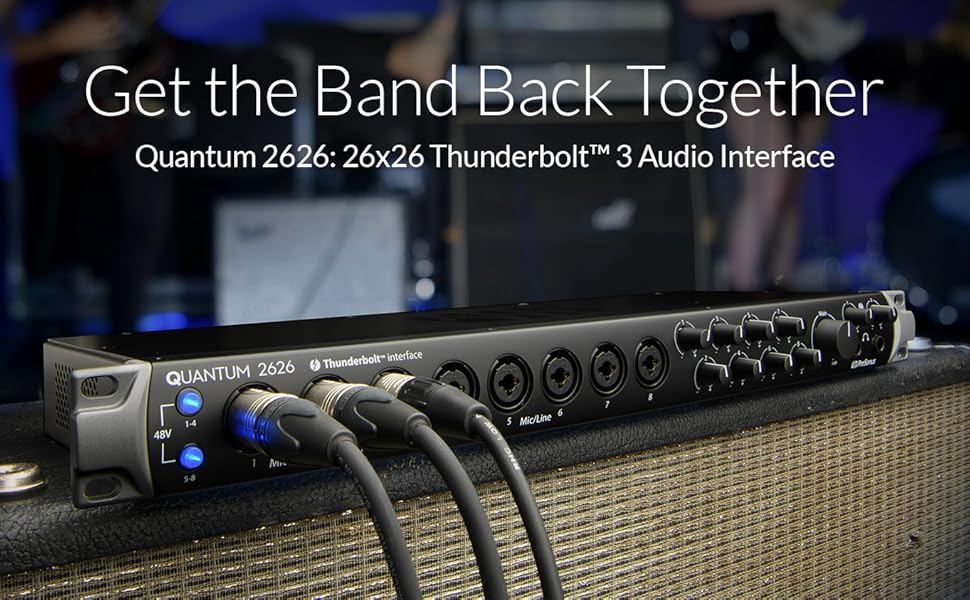
Record and monitor through your favorite plug-ins inside your DAW with the blazing fast speed only Quantum interfaces can deliver. The Quantum 2626 takes advantage of the jaw-dropping speed of Thunderbolt 3 to achieve a barely-measurable round-trip latency of less than 1 ms. Superb high-definition digital conversion and eight ultra-transparent analog XMAX mic preamps ensure your audio always sounds its best. Insert your favorite outboard gear with two direct preamp outputs and dedicated line-level returns. Expand your system up to 26 simultaneous inputs and outputs using ADAT Optical. Streamline your recording process and make better music, faster with the Quantum 2626.
From the Manufacturer
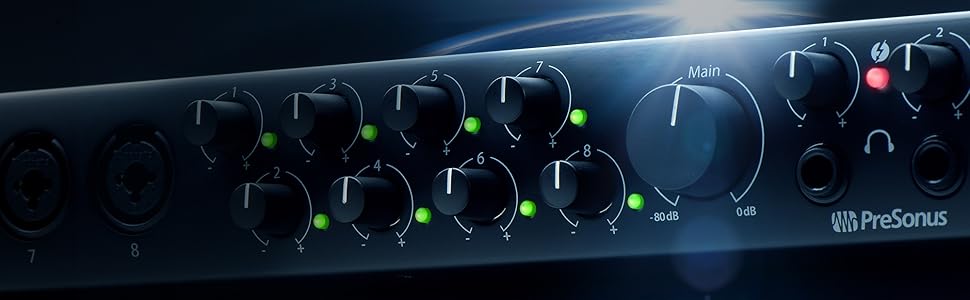
The world’s fastest interface, with a round-trip latency of less than 1 ms, using the Thunderbolt 3 bus; record and monitor through your favorite plug-ins in real time at up to 24-bit/192 kHz; 8 front-mounted, pristine XMAX analog mic preamps; 2 direct preamp outputs and 2 line returns for outboard effects; 8 balanced DC coupled analog outputs can provide control voltage to external analog equipment, using a DAW plug-in; up to 26 simultaneously inputs and outputs when expanded via ADAT Optical.
From the manufacturer
Quantum 2626
The Speed of Sound
With a barely measurable round-trip latency of less than 1 ms*, it’s no wonder Sound on Sound magazine dubbed Quantum-series Thunderbolt audio interfaces the “fastest audio interfaces on the planet.” Superb high-definition digital conversion and the ultra-transparent analog XMAX mic preamp design mean that your audio will always sound its best—whether you’re recording with or without your favorite plug-ins engaged in real-time.
*192 kHz, 64 sample buffer in Studio One 4.5 on a MacBook Pro 2016, 2.7 GHz Intel Core i7 running macOS 10.12.5
Features
|
|
|
|
|
|---|---|---|---|
Timeless audioEvery design decision during Quantum 2626 audio interface’s engineering was made with one goal in mind: blazing-fast speed without any sonic compromise. The Quantum-series proprietary Thunderbolt driver was written from the ground up to deliver ultra-low-latency performance while maximizing efficiency. Cutting-edge 24-bit, 192 kHz converters with 115 dB of dynamic range and superior low-jitter clocking—coupled with our ultra-transparent, pure analog XMAX preamps—result in superb audio quality with the lowest round-trip latency of any audio interface available (< 1 ms*). *192 kHz, 64 sample buffer in Studio One 4.5 on a MacBook Pro 2016, 2.7 GHz Intel Core i7 running macOS 10.12.5 |
Superior SoundAudiophile-grade digital converters, low-jitter clocking, and transparent preamps add up to a superior recording and listening experience. The Quantum 2626 audio interface operates at up to 192 kHz for ultra-high-definition mixing and recording. High-quality converters on every input and output provide 115 dB of dynamic range to capture complex musical harmonics smoothly and naturally with no audible distortion. And our lauded XMAX Class A analog microphone preamps deliver incredibly high headroom, deep lows, smooth highs, and a rich overall sound so you’ll hear every breath, transient, and detail in your recordings. |
Expansive audioImpressive speed combined with stunning sound quality means that the Quantum Thunderbolt audio interface is an ideal recording solution for any size of studio. Need more mic preamps? Connect the PreSonus DigiMax DP88 to your Quantum interface’s ADAT/dual S/MUX ports. Once synced, the DigiMax DP88 preamps can be remotely controlled via Studio One or UC Surface. Want to insert your favorite gear? The Quantum 2626 features two direct preamp outputs with dedicated returns, so you can insert your favorite analog compressor and your favorite plug-ins with ease. |
The Quantum leap.Industry-leading speed and pristine audio quality combined with jaw-dropping expandability are the hallmarks of the Quantum interface design. Record and monitor from your favorite DAW with any plug-in engaged. Insert your favorite outboard analog gear with ease. Regardless of your studio’s size, Quantum audio interfaces will streamline your recording process—you’ll make better music, faster. |


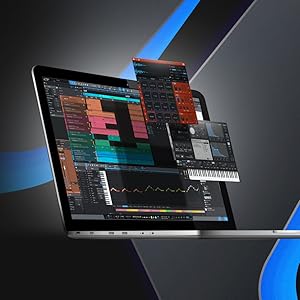
Award-winning recording software included
While compatible with any macOS or Windows recording application, the Quantum 2626 ships as a complete recording studio with Studio One Artist music production software included. Easy to learn, Studio One enables you to compose, record, and produce without getting distracted by the tools. Need a new loop or sample for your latest production? Studio One lets you shop, audition, and purchase new content right from your production environment—including powerful extensions for Studio One like the Presence XT Expansion packs and the PreSonus Channel Strip Collection.

Make your own magic.
At PreSonus, we want to make sure that our audio interfaces come with everything you need to craft your own mesmerizing spells in the studio. That’s why we include Studio One Artist with every audio interface product we make. But here in Louisiana, we have a word: lagniappe. It means “a little something extra,” and it’s in that spirit that we also include the Studio Magic Suite of software with our audio interface products.
The 2020 Studio Magic is a major step up from the 2019 edition, and includes Ableton Live Lite, tutorials from Melodics, 6 virtual instruments, and 9 effects plug-ins in VST, AU, and AAX formats… all unlocked for use inside Studio One Artist with a retail value of over one thousand USD!


Sean –
Great audio interface with a few unusual quirksThis is above all a great sounding interface. I recently moved to this platform from an old Focusrite Saffore Pro 40 Firewire. I still have that interface in my studio so I was able to A/B compare it with the Quantum 2626 Thunderbolt 3 interface.The difference in sound quality is immediately apparent. The best and most detailed comparison I could make between the two was by listening to the same audio tracks played on both interfaces through a pair of Sony Z1R headphones. The dynamics and overall clarity of the Q 2626 is far superior to the Pro 40. It’s a major upgrade. Perhaps that is to be expected due to the difference in age between the two platforms but I was always happy with the sound of the Pro 40, until I heard the Q 2626.I’d like to point out (as other reviewers have) what is perhaps thr biggest flaw in this unit, the lack of any hardware monitoring for any of the audio inputs. That omission has been fairly criticized but it’s not a dead end to your workflow that some other reviewers have implied. If you plug anything into the XLR/TRS inputs on the Q 2626 you WILL NOT hear it through the headphone jacks or the main outputs without doing more setup. This is not what most people are used to with their audio interfaces and I’d never encountered it in over 20 uears of audio production using many different audio interfaces in that time. In order to hear your microphone, guitar, keyboard or whatever you have plugged in to the Q 2626 you need to open your DAW software of choice and route the audio signal through there first. For example you plug your mic or instrument into the front panel of the Q 2626, then open a new project your DAW program of choice. I will use Cakewalk by Bandlab for example as it’s a well known and free DAW but the steps will be roughly the same for any DAW like Reaper, Studio One, Pro Tools, etc.Open a new project in your DAW software and select or insert an empty audio track, then press the button on the track that will enable Live Monitoring. In Cakewalk that would be the “input echo” button right next to the Record Arm button on the audio track. Once you do that you should immediately hear the audio from whatever you have plugged into the Q2626. If not then make sure you have the input on your audio track in your DAW set receive audio from the Q 2626 input where your mic or instrument is plugged in (Cakewalk has a drop down menu on the track to select this) and make sure the output on the same audio track is set to the Master Out for your mix, AND that your Master bus is set to output to the Q 2626.It’s easy for any experienced audio engineer or hobbyist, and while it may be work for a beginner, once you get a track template set up and saved you just need to reload it each time you need to monitor or record and you’re all set.That being said I do not prefer this implementation and would have liked Presonus to include a hardware mixer built in. I can only hope it was a worthwhile trade off from a design and engineering perspective and not some plan to get users hooked on subscription based audio production software from Presonus or to buy one of their outboard hardware mixers.. Even cheap $50 audio interfaces have hardware monitoring and have forever, but maybe a quality hardware monitoring implementation would have been too expensive? I’m stretching to give Presonus the benefit of the doubt here. There is an idea that because this is a Thunderbolt 3 interface that latency is a non factor, but there is always monitoring latency, and it will become worse if you are recording in a project with 100-200+ audio tracks and running dozens of plug in effects forcing you to increase the buffer size and adding more latency to live monitoring. Most people don’t have such needs though, and others who do cam get around it by upgrading their computer hardware to be more powerful if necessary.That being said what matters in the end to me is the quality of the audio this thing can produce. I don’t think you can do better for the money. It’s much better than I was expecting as having heard other Presonus interfaces in the past I was not impressed, but this unit is different and exceeded my expectations for audio quality by quite a lot.The preamps are full bodied and quiet even when turned all the way up. They also deliver great dynamics (to my ears) and the DI for guitar & bass excels in my opinion. It passes a very full, dynamic and clean DI signal that amp sims should love. It sounds great with Neural DSP Architype plug ins for example, partly because of the quality of the input from the Q 2626 preamp (use a good quality guitar cable too).Vocally the preamps also sound great to me, although there is likely better out there if you want to spend a lot more. These will be more than enough for most people if they have a decent mic to plug in.Another point I want to make is about the power plug on the back of the Q 2626. Yes it’s a small plug similar to one you’d see on an external hard drive or laptop computer, but what’s not readily apparent is that it’s a twist-to-lock plug. You have to insert it and give it a press-twist to lock it in place. Once that’s done the plug will not wobble and will stay in place much more securely.The power button on the back of the unit was a design mistake. It’s rack mount so most people can forget about being able to use it once the interface is racked. You’d have to leave it on 24/7 or rig it through a power strip or similar that has it’s own on/off switch. If it’s sitting on your desktop it’s less of a problem, or you can rack it on the bottom and leave an open space to get your hand behind it. The unit is not very deep, only about 6 inches so it’s not too bad if you have to do this.Build quality is solid. The unit jas a good weight to it and the volume knobs have a nice resistance to them, they don’t feel like cheap loose spinners.As for Thunderbolt 3 just make sure you are set up correctly if it’s not a native feature of your computer. In my case I run Windows 10 x64 on an AMD CPU platform that I built. My motherboard (Gigabyte) has a Thunderbolt header on it and I’m using Gigabyte’s Titan Ridge 2.0 Thunderbolt 3 PCI card. In my case I had to make sure I was using the correct PCI slot (the PCI x4 slot, usually located as the bottom slot on newer motherboards) and had to make sure the thunderbolt header on the motherboard was plugged into the Titan Ridge card and that both power cables were plugged into the back of the Titan Ridge card. You may also need a BIOS update to unlock thunderbolt fucntionality depending on the age of your BIOS. If you are an Intel or Mac user and your system came with native thunderbolt support you won’t have to worry about any of this, which is great.Assuming you have your thunderbolt connection properly set up you should get very good speed from this interface. If you are a windows user there are things you can do to further improve performance and reduce latency like turning off HPET, disabling C-States, setting power modes to max performance, and more you can look up elsewhere.I should mention that you WILL hear audio from your PC right out of the box when you plug the Q2626 in, so unlike jumping through hoops with live hardware monitoring, you can plug in to your conputer and hear audio from websites or games or MP3/FLAC players, or anything else. Quality is great too.Overall I feel this is a good unit for the money that should last many years. If you can deal with a few quirks then I think you’ll find it worth your while as the quality of the audio makes up for any other shortcomings.
Arthur C. Partida –
TerribleIf you can’t record with other tracks playing in real time….what’s the point? Absolutely terrible. Fire that product designer. Thunderbolt 3 completely sucks ass.The Firepods were outstanding and I built a CPU just to continue using them.
Rodger –
Connection issues? Make Sure You Have Enough Power!!I purchased this two months ago. I was initially very frustrated that my computer did not consistently recognize the Quantum, so much so that i had recently purchased a usb alternative to replace it. I ended up figuring out that the power cable to my thunderbolt card was split to another device. Once i ran its own PSU cable; BOOM! It works flawlessly. If you are having connection issues 1) ensure you are using a quality cable 2) ensure your thunderbolt pcie has adequate power. Each thunderbolt lane is 100w. If both lanes are occupied, a thunderbolt pci is basically equivalent power draw to an additional gpu.
Chris –
Get’s the Job Done for a Decent PriceBought this interface to temporarily replace my Focusrite Clarett 8PreX while it was in the repair shop, ended up liking the monitor amp and headphone amp sections a lot more than my Clarett and it allowed me to expand to 24 inputs once I got the Clarett, so I decided to keep it. The Presonus drivers, software package, and plugins are totally worth the investment. Got some nice perks out of the deal.-1 star agree that the power supply connection terminal needs modification to something that locks in better and the thunderbolt 3 port is a little techy…
Jeff –
Best audio interface everThis is something like my 5th audio interface that I’ve owned. One of those prior ones was the Presonus FP10 which this is something of the spiritual successor to. I’ve also used the UA Apollo Twin for a couple of weeks.This is the best audio interface I’ve ever owned by far.The interface sounds clean, but the real selling feature is the low latency. I can pretty much promise you that the interface won’t be the limiting factor in your setup. I can run on 16 samples at 96khz and get sub-ms response times cleanly (as long as it’s on a very simple use case). I can monitor inputs over ASIO with absolutely no detectable latency for things like vocals, guitar, etc.The lack of live monitoring is a bit unfortunate, but that kind of goes with the idea that you don’t need live monitoring when the latency is this low. Use something like voicemeeter if you need live monitoring.Compared to the Apollo Twin, this thing absolutely dominates. The Twin didn’t give me much better performance than FireWire interfaces I’ve used (yeah you read that right).
DC –
Using with a mac miniLove the unit, works great in my home studio. Definitely recommend if you are looking for non usb interface.
Marie Rose –
Does a few things well, but power supply is a disasterJust to add on to the existing reviews, one con is the power supply connector – where it enters the back of the unit – was absolutely under – engineered. Presonus used a tiny little cable and wimpy connector – and it actually wobbles once it joins into the unit! Too bad! A better way to physically handle this is to leave the power supply in the unit – and just have a (physically durable) standard cable connect to the unit. Other gear in our studio was engineered to handle an internal power supply – so Presonus really have no excuse.Second note: if you are going to try and save space and physically secure the unit (don’t want it to slide around)- which so many studios are going to do – due to the low depth of the form factor – it’s only 6” deep – it’s difficult to stack other gear (or a computer) on top of it. I had to fashion an impromptu 19” rack setup, and abandoned stacking a laptop on top of it. Had it been another few inches deeper – this would have gone smoothly. Who cares if it’s depth is a few more inches?Third note – it’s absolutely unacceptable to put the on off switch in the back!Fourth note – this unit rejected a fairly new Apple sourced TB3 cable – fortunately I had a spare.
Tenaz –
Owner’s ManualI was excited to receive this toy. However, upon receipt I realized that it uses Thunderbolt 2 and not 3. Good luck finding that anywhere in the owner’s manual.Second, my old PreSonus Audiobox USB interface did have direct input monitoring which was very handy. I could easily monitor and control the volume of the background music while recording the vocals. This helped in 2 ways. First, the music would not bleed into the vocal, and second the vocalist could hear his/her voice over the music. Well, this new toy does not have such feature and it is not designed for direct monitoring says PreSonus Technical Support. Great.Overall very poor documentation on this quality product.
Dan –
InterfaceWorks great with Mac Studio
Mitch Lieber –
Device doesn’t come with Thunderbolt 3 cable, PreSonus doesn’t mention that bit of infoI unboxed this interface in excitement to get it plugged in and working. However, this device doesn’t come with a thunderbolt cable apparently. I had to do some digging on the PreSonus forums and found out Apple cables are the only brand that are compatible with this interface. The company didn’t mention this anywhere on the product page. I’m rating this product with two stars because of the inconvenience. I had to spent an additional $35 for another cable and now i have to wait two days for the cable to arrive. I sure hope this is compatible with my 2012 iMac via the adapter I bought. If not, I’ll be returning this product and probably not purchasing from PreSonus again.