Overcoming “VR Sickness”: Best Practices for Integrating Headsets at Live Events
Virtual reality has become one of the most powerful immersive technologies available to event organizers. From virtual venue tours and product demonstrations to training simulations, gamified experiences, and digital twins, VR is helping conferences, trade shows, exhibitions, and brand activations deliver experiences that would be difficult or impossible to recreate in the physical world alone.
However, despite major advancements in hardware and software, one challenge continues to influence adoption: VR sickness.
Often referred to as cybersickness, VR sickness describes a collection of symptoms that some users experience during or after virtual reality sessions. These symptoms can include dizziness, nausea, eye strain, headaches, disorientation, fatigue, and motion discomfort. Even mild symptoms can negatively affect attendee satisfaction and discourage future participation.
For event organizers, the issue extends beyond user comfort. Poorly designed VR experiences can create operational disruptions, increase support requirements, damage brand perception, and reduce overall return on investment.
As VR becomes increasingly common across live events in 2026, understanding how to minimize VR sickness is becoming an essential component of event technology strategy. The goal is not simply deploying headsets—it is creating immersive experiences that remain comfortable, accessible, and enjoyable for the widest possible audience.
Understanding Why VR Sickness Occurs
Unlike traditional screen-based experiences, VR places users inside a simulated environment that responds to head and body movement.
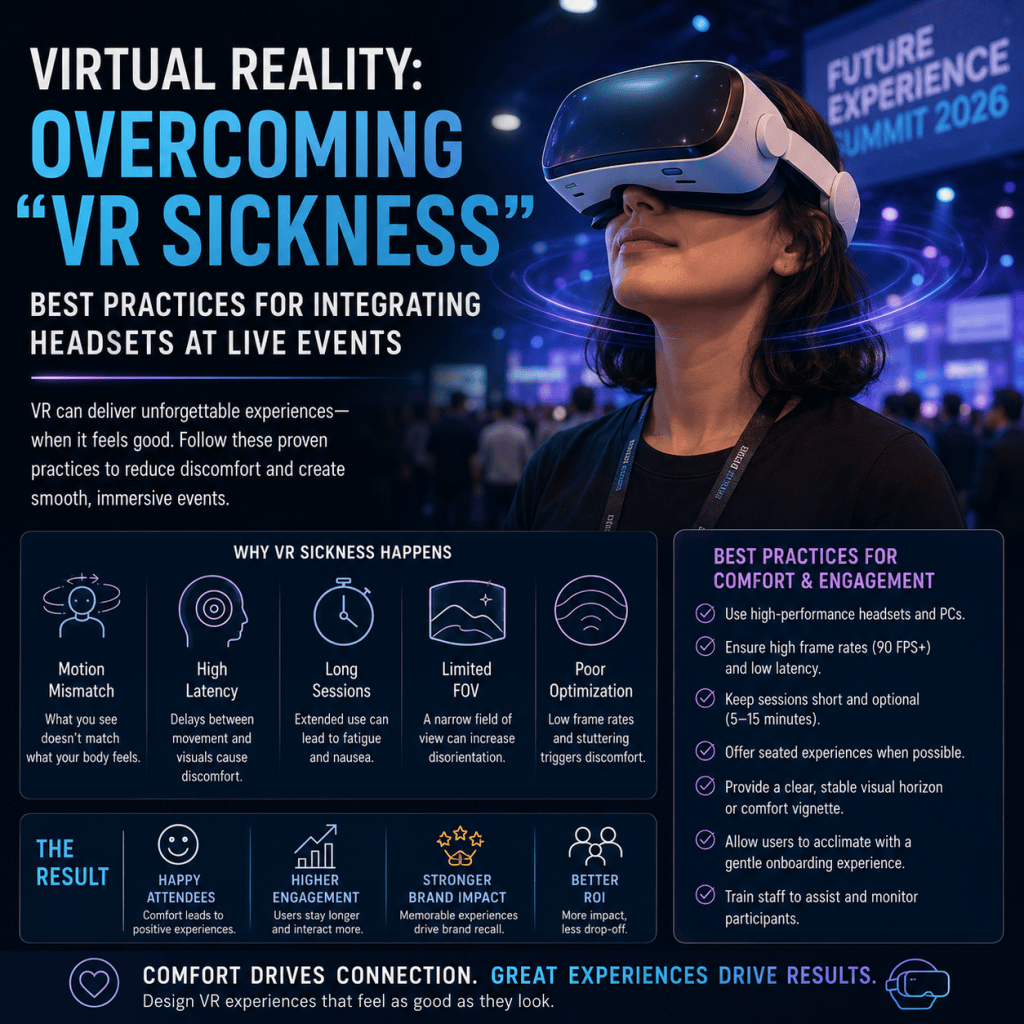
The primary cause of VR sickness is a mismatch between what users see and what their bodies physically feel.
Sensory Conflict
The human brain continuously combines information from:
- Vision
- Inner-ear balance systems
- Body movement sensors
- Spatial awareness mechanisms
When a VR experience shows movement that the body does not physically experience, sensory conflict occurs.
For example, a user may appear to move through a virtual city while remaining physically stationary.
The eyes report motion, while the vestibular system reports stillness.
This disagreement can trigger symptoms similar to motion sickness.
Individual Sensitivity Differences
Not all attendees respond to VR the same way.
Factors influencing susceptibility include:
- Age
- Previous VR experience
- Motion sickness history
- Fatigue levels
- Visual sensitivity
- Health conditions
Some attendees can tolerate extended VR sessions comfortably, while others may experience discomfort within minutes.
Event planners should assume a diverse range of user responses.
Why VR Comfort Matters for Events
The impact of VR sickness extends beyond individual attendees.
Reduced Participation Rates
Negative experiences can discourage users from completing experiences or participating in future activations.
Lower Sponsor Value
Branded VR activations depend on positive engagement.
If users associate an experience with discomfort, sponsor objectives may not be achieved.
Operational Challenges
Attendees experiencing symptoms may require:
- Assistance from staff
- Recovery time
- Seating accommodations
- Medical support in severe cases
This increases operational complexity.
Reputation Risk
As immersive experiences become part of event branding, attendee comfort directly influences perceptions of event quality and technological competence.
Selecting the Right Hardware
Hardware selection plays a major role in reducing VR sickness.
Prioritize Modern Headsets
Newer VR systems generally offer:
- Higher refresh rates
- Improved motion tracking
- Better optics
- Lower latency
- Enhanced ergonomics
These improvements significantly reduce motion discomfort compared to older generations.
Focus on Refresh Rates
Refresh rate directly affects perceived smoothness.
Most experts recommend:
- 90 Hz minimum
- 120 Hz preferred for premium experiences
Higher refresh rates help reduce visual lag and improve comfort.
Reduce Headset Weight
Heavy devices increase fatigue during longer sessions.
For event environments, lightweight standalone headsets often provide the best balance between performance and comfort.
Proper Fit and Adjustment
Poorly fitted headsets contribute to:
- Eye strain
- Pressure discomfort
- Visual misalignment
Staff should ensure each attendee receives proper fitting before beginning the experience.
Designing Comfortable VR Experiences
Hardware alone cannot eliminate VR sickness.
Experience design remains equally important.
Avoid Artificial Locomotion
One of the largest causes of VR discomfort is virtual movement controlled by joysticks or software.
Instead, consider:
- Teleportation systems
- Stationary experiences
- Room-scale movement
- Guided interactions
These approaches significantly reduce sensory conflict.
Keep Users Grounded
Experiences that maintain a stable visual reference point tend to produce less discomfort.
Examples include:
- Virtual showrooms
- Product demonstrations
- Training environments
- Venue walkthroughs
These scenarios generally perform better than fast-paced action experiences.
Limit Sudden Camera Movements
Rapid acceleration, rotation, and camera transitions frequently trigger discomfort.
Designers should prioritize:
- Smooth movement
- Controlled pacing
- Predictable transitions
throughout the experience.
Maintain High Frame Rates
Dropped frames can significantly increase nausea risk.
Content should be optimized to ensure stable performance across all hardware platforms.
Session Duration Best Practices
Many event activations make the mistake of keeping users immersed too long.
Ideal Event Session Lengths
For public events, most VR experiences should remain within:
- 3–5 minutes for first-time users
- 5–10 minutes for general audiences
- 10–15 minutes for experienced users
Shorter sessions improve throughput while minimizing discomfort.
Gradual Exposure
If experiences are longer, organizers should provide opportunities for attendees to:
- Pause
- Remove the headset
- Rest briefly
This helps reduce cumulative effects.
Recovery Zones
Large VR activations benefit from designated recovery areas where attendees can sit comfortably after completing experiences.
Staff Training and User Preparation
Event staff play a critical role in attendee comfort.
Pre-Experience Briefing
Attendees should understand:
- How the experience works
- Expected movements
- Available controls
- How to exit if uncomfortable
Clear instructions reduce anxiety and confusion.
Monitoring Participants
Staff should watch for signs including:
- Unsteady posture
- Facial discomfort
- Hesitation
- Balance issues
Early intervention helps prevent more severe symptoms.
Encouraging Self-Reporting
Attendees should feel comfortable stopping immediately if they experience discomfort.
There should be no pressure to complete experiences.
Accessibility Considerations
Not all attendees can comfortably participate in VR.
Provide Alternative Experiences
Whenever possible, organizers should offer:
- Video versions
- Interactive displays
- Mixed-reality alternatives
- Touchscreen experiences
This ensures broader accessibility.
Seated Experience Options
Many attendees feel more comfortable using VR while seated.
Providing seating options can improve participation rates.
Clear Health Guidance
Signage should identify potential concerns for individuals with:
- Motion sensitivity
- Epilepsy
- Balance disorders
- Certain medical conditions
Transparency helps attendees make informed decisions.
Emerging Technologies Reducing VR Sickness
The industry continues investing heavily in comfort improvements.
Eye Tracking
Modern eye-tracking systems help optimize rendering performance and reduce visual strain.
Foveated Rendering
This technique improves efficiency by prioritizing detail where users are looking directly.
The result is smoother performance and greater comfort.
Mixed Reality Integration
Many new experiences blend physical and virtual environments.
Because users maintain awareness of real-world surroundings, discomfort levels are often lower.
AI-Driven Comfort Optimization
Artificial intelligence is increasingly used to:
- Adjust movement speeds
- Personalize experiences
- Detect discomfort indicators
- Optimize visual performance
These systems may significantly reduce VR sickness over the next several years.
Measuring Success Beyond Engagement
Many event organizers focus exclusively on participation metrics.
Comfort metrics are equally important.
Useful indicators include:
- Completion rates
- Average session duration
- Early exits
- User feedback scores
- Repeat participation
- Support requests
High engagement combined with high comfort typically indicates successful VR implementation.
The Future of Comfortable Event VR
As hardware continues evolving, VR sickness is expected to become less common.
Advances in:
- Display technology
- Sensor accuracy
- Mixed reality systems
- AI optimization
- Spatial computing
are steadily reducing the factors that contribute to discomfort.
While complete elimination may not be possible for every user, future systems will likely offer substantially more comfortable experiences than earlier generations.
Conclusion
VR sickness remains one of the most important considerations when deploying immersive experiences at live events. While the technology offers extraordinary opportunities for engagement, education, training, and entertainment, attendee comfort must remain a primary design objective.
Successful event implementations combine modern hardware, thoughtful experience design, appropriate session lengths, trained staff, and clear accessibility planning. By prioritizing comfort alongside innovation, organizers can maximize participation while minimizing the risks associated with virtual reality exposure.
In 2026, the most successful VR activations are no longer judged solely by how immersive they are. They are evaluated by how effectively they deliver memorable experiences while ensuring attendees remain comfortable, confident, and eager to participate again.