Monitors and Screens: The Visual Infrastructure Powering Modern Events
Monitors and Screens: The Visual Infrastructure Powering Modern Events
Introduction: Beyond Displays to Integrated Visual Systems
In modern event environments, monitors and screens are no longer simple display tools. They function as integrated communication infrastructure that supports presentations, navigation, branding, audience engagement, operational monitoring, and hybrid participation.
From massive LED walls on keynote stages to compact confidence monitors used by speakers, visual display systems shape how attendees consume information and experience events. As events become increasingly immersive and technology-driven, screen ecosystems must support real-time content delivery, synchronization, scalability, and integration across physical and digital environments.
For event technology leaders, monitors and screens are not isolated hardware components—they are strategic interfaces connecting audiences, content, and operational systems.
Categories of Event Display Systems
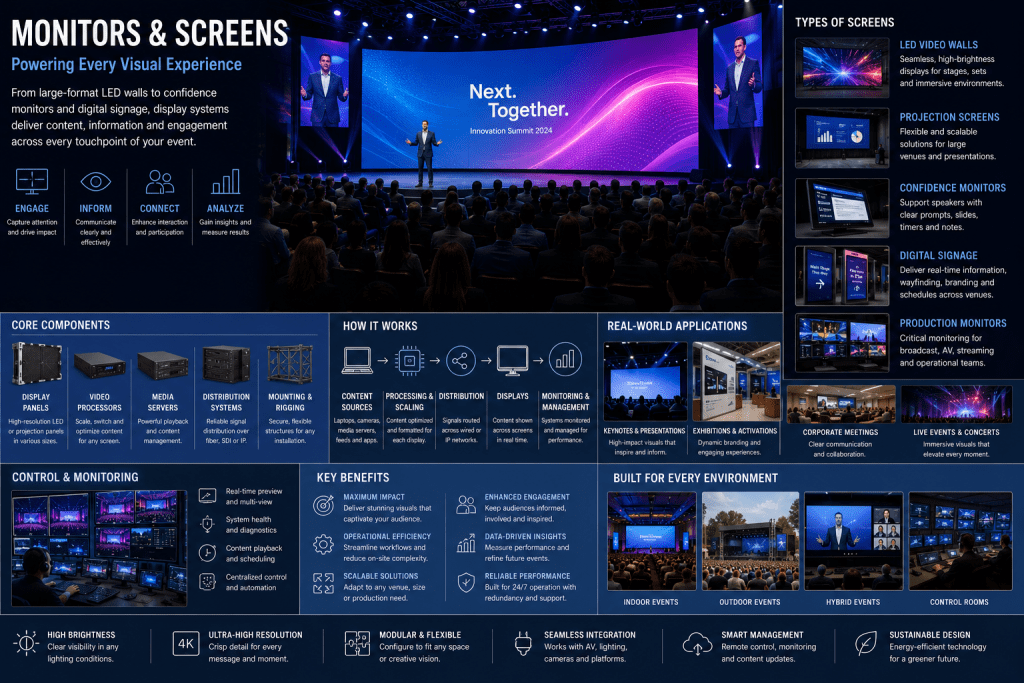
LED Video Walls
LED walls are the dominant large-format display technology in modern events.
Key characteristics include:
- High brightness and visibility in varied lighting conditions
- Modular construction for flexible sizes and shapes
- High refresh rates for smooth video playback
- Scalability for indoor and outdoor environments
Applications include:
- Main stage backdrops
- Immersive visual environments
- Sponsor branding and dynamic content
Projection Screens
Projection systems remain widely used for large venues and flexible deployments.
Advantages include:
- Cost efficiency for large surfaces
- Easy scalability
- Suitability for projection mapping and immersive experiences
Performance depends heavily on ambient light control and projector alignment.
Confidence Monitors
Confidence monitors are placed within the speaker’s view to support live presentations.
They typically display:
- Presentation slides
- Speaker notes
- Timers and cue prompts
These systems improve presenter confidence and operational coordination.
Digital Signage Displays
Digital signage systems provide distributed information throughout venues.
Common use cases include:
- Wayfinding and navigation
- Session schedules and updates
- Emergency communication
- Advertising and sponsor messaging
These displays are usually centrally managed through content management systems.
Production and Control Monitors
Operational teams use monitoring screens within control rooms and production environments.
These systems display:
- Camera feeds and program outputs
- Audio and video diagnostics
- Analytics dashboards
- Streaming and system health data
They are critical for maintaining operational visibility during live events.
Core Components of Screen Ecosystems
Content Sources
Display systems receive content from multiple sources such as:
- Presentation laptops
- Media servers
- Broadcast cameras
- Streaming platforms
- Graphics engines and data feeds
Managing multiple formats and resolutions is a key operational challenge.
Video Processing Systems
Video processors and scalers adapt content for display environments.
Functions include:
- Resolution conversion
- Multi-screen composition
- Aspect ratio correction
- Color calibration
Advanced processors support ultra-high-resolution and real-time rendering workflows.
Distribution Infrastructure
Video signals are distributed through:
- HDMI and SDI networks
- Fiber optic systems
- IP-based video transport protocols
Modern events increasingly use AV-over-IP systems for scalability and flexibility.
Content Management Platforms
Digital signage and distributed display systems rely on centralized software platforms for:
- Scheduling and automation
- Remote updates
- Dynamic content control
These systems enable synchronized communication across large venues.
System Architecture: Real-Time Visual Delivery Pipeline
Modern display ecosystems operate through an integrated visual pipeline.
- Content is generated or captured
- Processing systems optimize and scale content
- Distribution networks route signals to displays
- Screens render synchronized visuals in real time
- Monitoring systems ensure quality and reliability
This architecture must support low latency, high resolution, and operational resilience.
Integration with Event Technology Ecosystems
Video Production Systems
Display systems integrate directly with live video production environments to deliver synchronized visuals across stages and streams.
Audience Response and Engagement Platforms
Screens display:
- Live polls and voting results
- Q&A interactions
- Social media feeds and analytics
This supports real-time audience participation.
Event Data Platforms
Dynamic displays can adapt based on real-time data such as:
- Session occupancy
- Crowd flow
- Personalized attendee messaging
Hybrid and Virtual Event Platforms
Screens increasingly bridge physical and virtual audiences by displaying remote participants, live streams, and collaborative content.
Experience Design and Audience Impact
Visual Clarity and Accessibility
Screen placement and resolution directly influence visibility and comprehension.
Effective systems consider:
- Viewing angles
- Font readability
- Contrast and brightness
- Accessibility requirements
Immersive Experience Design
Large-scale displays contribute to immersion by integrating with:
- Lighting systems
- Projection mapping
- XR and mixed reality environments
Branding and Storytelling
Screens serve as dynamic storytelling platforms that reinforce brand identity and emotional impact.
Operational Benefits
Real-Time Communication
Display systems enable immediate dissemination of schedules, updates, alerts, and announcements.
Scalability Across Venues
Distributed screen networks support large multi-room and multi-venue events.
Improved Operational Visibility
Production teams use monitor ecosystems to manage live event execution effectively.
Technical Challenges
Resolution and Format Compatibility
Managing multiple resolutions, aspect ratios, and formats across devices remains complex.
Synchronization and Latency
Large-scale screen networks require frame-accurate synchronization to avoid visual inconsistencies.
Bandwidth and Infrastructure Requirements
High-resolution video delivery demands substantial bandwidth and robust networking infrastructure.
Environmental Constraints
Ambient lighting, venue size, and viewing distance affect display performance and visibility.
Future Trends: Intelligent and Adaptive Display Ecosystems
AI-Driven Content Optimization
AI systems will dynamically adapt screen content based on audience behavior and contextual data.
Flexible and Transparent Displays
Advances in microLED and transparent display technologies will enable more immersive architectural integration.
Interactive and Touchless Interfaces
Gesture recognition and sensor-based interaction will transform passive screens into responsive interfaces.
Spatial Computing Integration
Future display systems will increasingly integrate with AR, VR, and holographic environments to create unified spatial experiences.
Conclusion: Screens as Strategic Event Infrastructure
Monitors and screens have evolved from static presentation tools into dynamic visual ecosystems that power communication, engagement, and operational control.
By integrating display technologies with real-time content systems, analytics, and immersive platforms, event organizers can create environments that are visually cohesive, interactive, and highly scalable.
For event technology leaders, the future lies not in deploying more screens—but in designing intelligent visual infrastructures that adapt, inform, and engage audiences across every layer of the event experience.