





Description
Overview
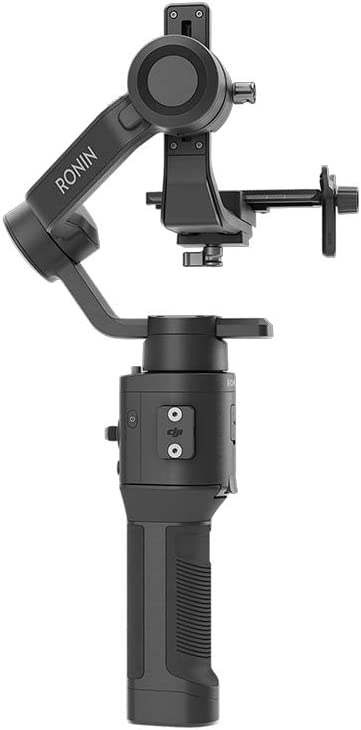
The Ronin-SC stabilizer for mirrorless cameras supports a wide range of cameras and lenses. It has been rigorously tested to support a payload of 4.4 lbs / 2.0 kg while still achieving a smooth, cinematic shot.
Features
Unobstructed Roll
An innovative axis arm framework elevates camera payload above the roll axis, keeping the camera’s built-in display free of obstruction. After DJI introduced this concept, it has been embraced throughout the handheld gimbal industry.
Panorama
Smooth, automated movement control allows you to create panoramas with unparalleled quality and precision.
Timelapse
Make the passage of time your ultimate storytelling tool, capturing sunsets and blossoming flowers in a steady frame.
Ronin App
The Ronin app has also been improved for an even better user experience making Ronin-SC professional and easy to use. The app also minimizes hardware tuning, setting filmmakers free to produce great footage.
Simple Setup with Safety Features
Axis locks on each arm allow for faster storage and individual axis balancing. The Quick-Release Plate includes a positioning block to memorize the perfect camera position for instant remounting. When powering off, the motors gradually power down the gimbal, ensuring reliability and quick setup wherever your shot takes you.
Compatible with – Canon: EOS M50, M6 Mark II, R, RP; Fujifilm: X-E3, X-H1, X-T2, X-T20, X-T3, X-T30; Nikon: Z50, Z6, Z7; Panasonic: G9, G95, GH3, GH4, GH5, GH5S;Sony: A6000, A6100, A6300, A6400, A6500, A6600, A7, A7M2, A7M3, A7R2, A7R3, A7R4, A7S, A7S2, A9, Rx10 III, Rx10 IV, RX100 V, Rx100 VI, Rx100 VII
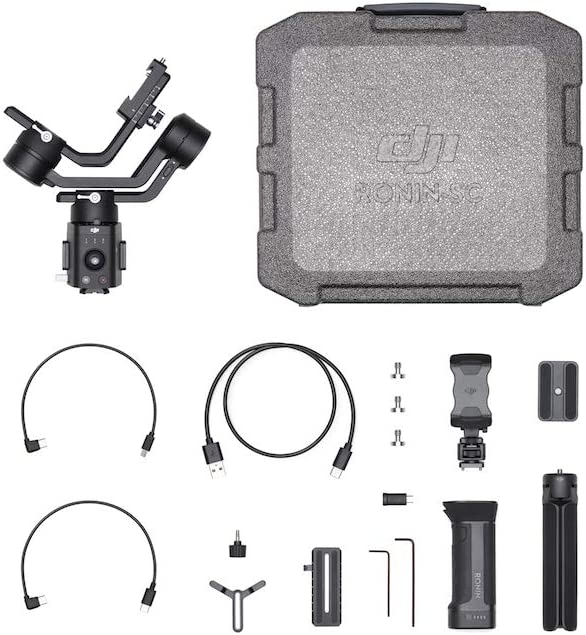
In the Box
– DJI Ronin-SC × 1
– BG18 Grip (Built-in Battery) × 1
– Extended Grip/Tripod (Plastic) × 1
– Quick-Release Plate × 1
– Camera Riser × 1
– Carrying Case × 1
– Phone Holder × 1
– Lens Support × 1
– 8-pin Port Cover × 2
– Wrench × 2
– Camera Screw 1/4″-20 × 3
– Multi-Camera Control Cable (Multi-USB) × 1
– Multi-Camera Control Cable (Type-C) × 1
– USB-C Cable × 1
– Multi-Camera Control Adapter (Type-C To Micro USB) × 1
– Screw M4 × 4
Note:
1. When the gimbal is folded and not connected to the BG18 Grip.
2. Depending on actual payloads mounted to the gimbal, counterweights for balancing may be required.
3.Firmware updates will include regular updates to the Command Unit for better user experience.
4. Monitor function only available for cameras with built-in Wi-Fi transmission.
From the manufacturer


Lightweight & Compact
Opening possibilities for filmmakers and content creators in almost any situation, Ronin-SC was built to go anywhere. Magnesium and aluminum construction, along with high-strength composite materials provide robust performance at just 1.1 kg. With a modular, quick setup design, Ronin-SC can pack neatly in limited spaces and be carried with ease.
Gives A Perfectly Stable Shot
Even in action-packed scenes, Ronin-SC gives a perfectly stable shot. Sport mode improves the sensitivity of each axis while continuing to maintain stabilization, making Ronin-SC more effective in fast follows, sudden motions, and even complete changes in direction.

Accessories You’ll Love
 Ronin-SC BG18 Grip
|
 Ronin-S/SC Focus Wheel
|
 Ronin-S/SC Command Unit
|
|---|---|---|
Makes Ronin-S compatibleThe BG18 Grip makes Ronin-SC compatible for handheld use. |
Helps control camera focusThe Ronin-S/SC Focus Wheel helps control camera focus. |
Remote controlAdjust motor settings, switch operation modes, and select settings. |
Powers the gimbalA 2450 mAh built-in battery powers the gimbal for up to 11 hours. |
Easy to mountEasy to mount the Focus Wheel onto the 8-pin port of the Ronin-S/SC handle. |
Access the Create featureUsers can also access the Create feature directly through the Command Unit. |







Rick Dubbs –
Ronin SC Nikon CompatibilityI am a still photographer. None of this review is for video features. I got the Ronin SC to shoot astrophotography panaramas with my Nikon D500. Currently (9/4/2022) DJI says that the only Nikon DSLRs that are compatible are the D500, D780, & D810. Of course, the body/lens combination would have to be 4.4 pounds, or less. While I have not tried all of the features, the ones I’ve experimented with, so far, work without a connection (if you’re planning to trip the shutter without using the Ronin SC). If you’re not needing to connect the body to the Ronin SC for camera control, then any non-extended DSLR body should work. I haven’t tried it with my battery grip attached.One issue folks have is the manual is mostly silent on how to connect the D500 for camera control. While DJI says that the cables are included, it was not obvious to me how they were supposed to work. Well, file this in the category of, “you learn new something every day.” I just got a Ronin SC, and I shoot with a Nikon D500. The D500 is listed on DJI’s compatibility list, and the manual says to use the USB C cable with the micro adapter. The D500 also has a Type 3 micro port, and no Type 3 micro adapter was included, which seemed really odd, to me.I also tried a C to Type 3 micro cable I have for an external HDD, but no joy. I learned a couple of things reading forum comments including that the C to C camera cable is not just a standard C cable (DJI said they were in the process of developing a new cable for another camera), and, apparently, you can use just half the Type 3 micro port. An adapter that looks like a C to micro A adapter comes with the Ronin SC.Long story short (I know – too late), I attached the DJI micro A adapter to the DJI camera control cable, plug the adapter into the bigger side of the Type 3 micro port (where it will fit), and my D500 works just fine. Enjoy!
Matt Wetta –
Easy to use, Great quality and Amazing ValueThe media could not be loaded.
I didn’t buy this Gimbal to save money. I bought it specifically to use with the A7c and keep my video rig as light as possible. I film content creation so I am holding this thing for hours and hours. The SC is lighter than the pro models and one of the lightest gimbals that can load up to 4 lbs.It’s easy to use, very sturdy and the motors have great durability.You can set 3 different custom modes, the mobile app lets you fine-tune each setting and get it the way you want. I like the simplicity. I don’t need LCD screens on my gimbal. I just need 3 modes. POV/sport – Pan only – and 360. It has bonus features like tracking with your phone, wireless control, and panorama. I haven’t really used these much. The Pano feature is a bit complicated.Balancing is relatively easy. Once you get the hang of it. It took me about 3 tries and I’ve gotten good enough at balancing to change prime lenses in the middle of filming and balance in less than a minute.The footage is a bit smoother than the DJI OM4 I phone Gimbal. I had no jitters but you could see the walking patterns. Premiere pro cleans up most of it but if you want ultra smooth you’ll want the Sony software. If you’re using this with other cameras, Premiere auto Stabilization will work 75% of the time.I messed up in this example clip, but what you want to do is record B-roll type stuff in 60 FPS and slow it down to 30 and the movement will be much smoother than in my clip.
Raul delacruz –
DJI GimbalIts ok for the price and easy to use, I used on my Nikon Z6ii no problem
Mary Randall –
Very difficult setup plus app issuesAfter much frustration and watching hours of videos I finally got my unit set up and it appears to be working. A couple of problems is the manual is about 3pt type that is impossible to read and does not walk you though anything practical. A nice start- setup guide would be good. I finally found a nice video on you tube that helped however the next issue was the app itself. I tried and tried to get the app to connect from the play store on android and could not get it to connect to the device. It could see it in Bluetooth but not connect. I finally found a phone number for support and discovered two problems. First, the only app on the Play store was old and not the right one (no mention of that anywhere online or in the manual) Next, the support guy, although difficult to understand was nice enough to point me in the right direction on the DJI site to download a executable to install the app however, I have a company phone and it will only install apps from a verified source and would not install the app. I was able to use an old iPhone to download and it seemed to work. I still have not figured out how the app works completely and I get strange popups that refence something technical that I don’t understand what it is saying. Hopefully a few more hours of YouTube videos will get me comfortable.After balancing and connecting everything the unit does seem to work well with one additional problem I still can’t figure out when using the Canon connect app to use as a monitor. My phone keeps going to sleep and I can only increase the time to 1 minute in the settings. This may just be due to being a company phone and not DJI’s problem.I am excited to try this out on a video shoot this weekend and will update the review after some hands on use
Rogelio –
Bueno, pero solo 100% compatible con cámaras carasel producto es muy bueno, estabiliza bien y es relativamente sencillo de usar, una vez te acostumbra a el, mi única queja es que el dispositivo viene con funciones en las que es necesario conectar la cámara, pero por alguna extraña razón, cámaras de entrada como la t8i (aunque es un modelo reciente) no tienen compatibilidad lo cual, la verdad esta muy mal, teniendo en cuenta que es un producto de cierto precio, no debería limitarse a ser compatible solo con modelos caros, me encantaría que sacaran una actualización de software que permitiera por lo menos usar el botón del obturador que viene en el estabilizar con cámaras como la t8i.
Amazon Customer –
SAVE YOUR MONEY, BUY SOMETHING ELSEWe have used this gimbal for 2 years now, constant issues with gimbal going limp in certain tilts. Sometimes will vibrate so bad you have to recalibrate the gimbal and that don’t even work every time. We have shot multiple wedding videos with this gimbal and at least one time per wedding the gimbal goes limp and won’t go back to normal until we reset it and hold it in a certain position. I recommend saving your money and getting something better because we absolutely hate this gimbal. If you plan on using it for basic stuff like stand still shots then buy it but for anything that requires you to get low and walking shots this thing blows. We even took it on a snowboarding trip expecting it to do okay and looking back on the camera footage, it was all unusable due to it being super shaky footage. We were even super smooth with the gimbal and camera on the boards, just awful steadiness. Like I said save your money we are absolutely done using this gimbal. Just so your aware we have watched a lot of YouTube videos for calibrating this thing and making sure we Calibrated it right, still didn’t make a difference. Hopefully you guys can learn from us. This thing has made us so upset we wrote a review on it 2 years later lol
Donny Kim –
THIS WORKS WITH A7IV, A7M4, A7 4It was impossible to find the answer for the compatibility with this Ronin SC for Sony A7 IV and the answer is YES IT DOES. I just tried out with my A7IV with kit lens on it.
Brian B –
Tricky but goodI underestimated how much time it would take to set up and use properly. Ultimately it’s a good quality product but if you’re new to these like me give yourself some time to learn to use it
Christian D. –
Ideal para principiantesUna vez aprendes a utilizarlo es muy fácil estabilizar la cámara, además, la función “prueba de equilibrio” en la app de Ronin hace que tengas la seguridad de haber hecho las cosas bien.Su batería es de larga duración y carga rápida. Lo único negativo que le encuentro es que es bastante pesado y luego de un rato de trabajo te sientes cansado de cargarlo.
Balwin –
Returned for RefundThe media could not be loaded.
This thing seems really nice but the gimbal motors struggle with a lightweight camera after balancing. The balancing is really complicated and the DJI Ronin app instructions are terrible. Youtube is your friend when it comes to this. The Ronin SC is a cool toy but I had to return it because it would not interface with my outdated Sony A5100 firmware; however please note this is not the reason for my review rating. I bought this on sale and figured I would give it a try. With the A5100 I was able to get it to work using the Sony Imaging Edge app using the remote shutter feature, but this kills my phone and camera battery. Again this is my problem and not related to the product.Even without the proper interface the movements were choppy and the gimbals seem to struggle with my A5100 / SEL35F18 super lightweight combo. If you plan on using this with a similar body such as the A6000 series please note you will have to attach a mounting plate riser plate which requires a flathead screwdriver to install/remove. Even if it worked with my camera I would return it on this fact alone. I don’t like that I need to use a screwdriver to switch between my tripod mounting plate and this atrocious gimbal mount contraption. I also dont like the fact that a rebalancing is required every time the lens is switched. The only way I can recommend this gimbal is if you are serious about vlogging and have a dedicated body/lens set up to permanently stay on the gimbal; even then an extra gimbal battery is necessary. This is a cool toy but I would highly advise not choosing this if you are a casual hobbyist.